
Geometric Construction Example: Generator
Loading the math board and drawing, please wait…
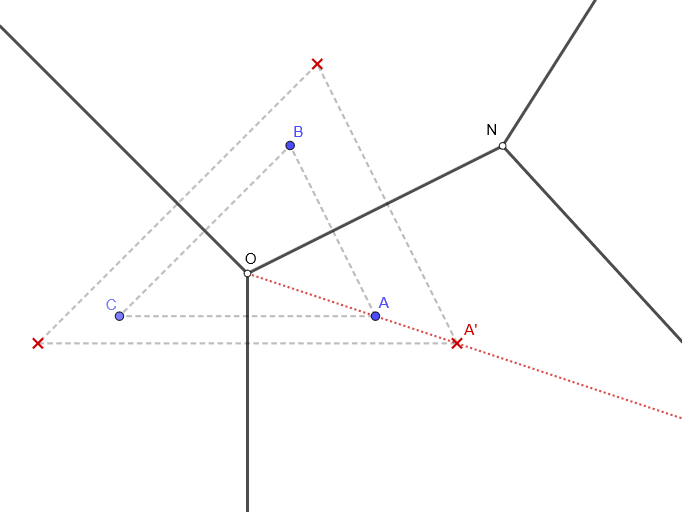
This example demonstrates the process of constructing specific geometric figures using geometric construction tools. The core math concepts involved include geometric constructions, angles, reflections, and polygons. Key construction points extracted from the GeoGebra command summary include LineBisector (angle bisector), TriangleCenter (triangle center), Ray (ray), Point (point), Mirror (reflection), and Segment (line segment). Suitable for high school mathematics teaching or for geometry enthusiasts learning complex figure construction methods.
GeoGebra Commands & Parameters
LineBisector(B, C) → hLineBisector(A, B) → fTriangleCenter(A, B, C, 3) → ERay(E, A) → lLineBisector(A, C) → gPoint(l) → A'Mirror(A', g) → C'Mirror(A', f) → B'Point(g) → IRay(E, I) → iPoint(h) → JRay(E, J) → jPoint(f) → DRay(E, D) → kPoint(k) → FSegment(E, F) → mRay(F, H) → nRay(F, G) → p
AI Drawing Prompt Reference
Draw a geometric figure by first constructing two angle bisectors, then finding the triangle center and drawing a ray from it to a vertex. Reflect using the angle bisectors and ray to obtain three new points. From the center, draw rays to two of these new points, and find the third using the angle bisectors. Finally, connect the center to another new point and draw rays from it in two directions to complete the figure.
The prompt above was compiled from the original drawing commands and is for reference only.