
Geometric Construction and Verification of Parabola Definition
Loading the math board and drawing, please wait…
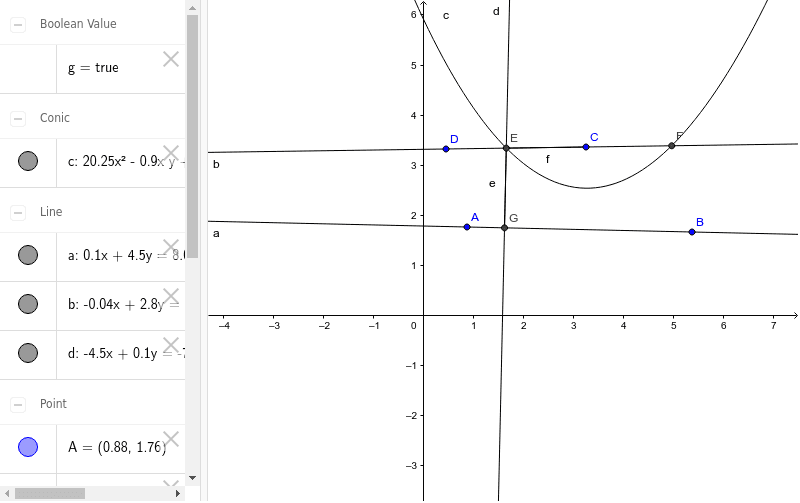
This GeoGebra example demonstrates the geometric construction and verification of the parabola definition. A parabola is the locus of points in a plane equidistant from a fixed point (focus) and a fixed line (directrix. Construction steps: 1) Use Line command to draw the directrix; 2) Use Parabola command to create a parabola with focus and directrix; 3) Use OrthogonalLine command to construct perpendicular from focus to directrix; 4) Use Intersect command to find key intersection points; 5) Use Segment command to draw relevant line segments for verifying the parabola definition. Suitable for middle and high school coordinate geometry teaching, helping students understand parabola concepts, master geometric construction techniques, and verify locus properties.
GeoGebra Commands & Parameters
Line(A, B) → aParabola(C, a) → cLine(D, C) → bIntersect(c, b) → E, FOrthogonalLine(E, a) → dIntersect(d, a) → GSegment(E, G) → eSegment(E, C) → fProve(e ≟ f) → g
AI Drawing Prompt Reference
Draw a horizontal line as the directrix and place a point above it as the focus. Construct the parabola defined by this focus and directrix. Then draw a line through the focus perpendicular to the directrix, intersecting the parabola at two points. Choose one intersection point, and from it drop a perpendicular to the directrix, marking the foot. Connect this point to the foot and to the focus with line segments. Finally, verify that these two segments are equal in length, confirming the point lies on the parabola.
The prompt above was compiled from the original drawing commands and is for reference only.