
Geometric Construction and Transformation Example in GeoGebra
Loading the math board and drawing, please wait…
In collections
Realidades de GeoGebra
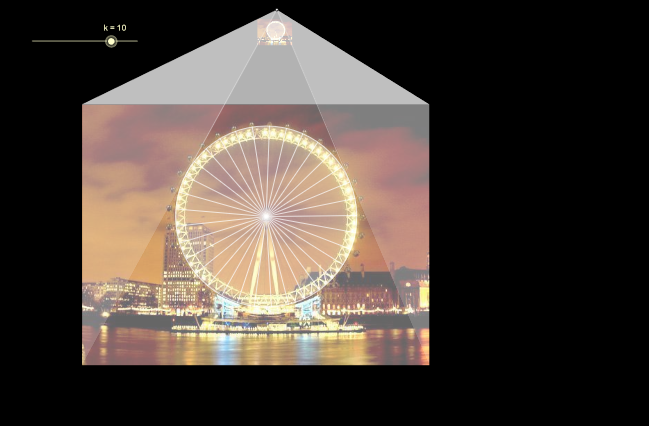
This example demonstrates geometric construction and transformation using GeoGebra. Key mathematical concepts include similarity transformations, properties of circles and triangles. Construction involves commands like Ray, Dilate, Polygon, Circle, and objects such as Point, Intersect. Suitable for middle or high school mathematics to understand geometric transformations and figure construction.
GeoGebra Commands & Parameters
Ray(A, C) → aRay(A, B) → bRay(A, D) → cDilate(B, k, A) → EDilate(C, k, A) → FDilate(D, k, A) → GPolygon(A, E, G) → P, g, a1, ePolygon(A, F, E) → Q, e1, a2, fDilate(H, k, A) → IPolygon(A, G, I) → R, i, a3, g1Polygon(A, F, I) → S, i1, a4, f1Circle(J, radio) → dDilate(J, k, A) → KCircle(K, (radio * k)) → hTangent(A, h) → j, lIntersect(h, l) → LIntersect(h, j) → MSegment(L, A) → mSegment(A, M) → nPoint(h) → NOrthogonalLine(A_2, yAxis) → q2Point(q2) → B2Dilate(B2, k, A_2) → C2OrthogonalLine(B2, q2) → r2Point(r2) → D2Circle(B2, D2) → s2Ray(A_2, D2) → t2Intersect(s2, r2, 2) → E2Ray(A_2, E2) → b3OrthogonalLine(C2, q2) → c3Intersect(t2, c3) → F2Intersect(b3, c3) → G2Segment(F2, G2) → d3Segment(A_2, F2) → e3Segment(A_2, G2) → f3Segment(A_2, C2) → g3Sequence(Segment[K, Rotate[N, ((2 * 3.141592653589793) * s / 33), K]], s, 0, 32) → lista1
AI Drawing Prompt Reference
Construct a figure with a shared vertex and three rays from it. Use similarity (dilation) centered at the shared vertex to map points along each ray to new corresponding points, then connect these points to form several polygons/triangles. Next, create a circle from a defined radius point, and apply a scaling to get another circle radius. Draw tangents from the shared vertex to the scaled circle, intersect the tangent with the circle-related lines to obtain intersection points, and connect key pairs with segments. Add orthogonal lines to obtain perpendicular projections and use their intersections to define additional points and circles. Finally, perform a rotation about a chosen point to generate a sequence of points positioned around a circular path.
The prompt above was compiled from the original drawing commands and is for reference only.