
GeoGebra Rotation and Dilations Slider Example
Loading the math board and drawing, please wait…
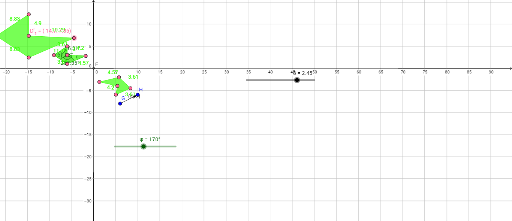
This example demonstrates the application of rotation and dilation transformations in GeoGebra. By adjusting the slider, dynamic changes in points and shapes can be observed. Key mathematical concepts include rotation and dilation. Commands used include Polygon, Angle, Intersect, Rotate, Dilate, and Vector. Suitable for students at the junior high school level and above learning geometric transformations.
GeoGebra Commands & Parameters
Polygon(A, B, C, D, E) → poly1, a, b, c, d, eAngle(B, A, E) → αAngle(A, E, D) → βAngle(E, D, C) → γAngle(D, C, B) → δ_1Angle(C, B, A) → εIntersect(xAxis, yAxis) → FRotate(A, ψ, F) → A'Rotate(B, ψ, F) → B'Rotate(C, ψ, F) → C'Rotate(D, ψ, F) → D'Rotate(E, ψ, F) → E'Polygon(A', B', C', D', E') → poly1', a', b', c', d', e'Dilate(A, δ, F) → A'_1Dilate(B, δ, F) → B'_1Dilate(C, δ, F) → C'_1Dilate(D, δ, F) → D'_1Dilate(E, δ, F) → E'_1Polygon(A'_1, B'_1, C'_1, D'_1, E'_1) → poly1'_1, a'_1, b'_1, c'_1, d'_1, e'_1Vector(G, H) → u
AI Drawing Prompt Reference
Draw a pentagon and label its vertices and interior angles. Use a slider to control the rotation angle, rotating the pentagon around the origin and showing the rotated shape. Then use another slider to control the scaling factor, scaling the pentagon around the origin and showing the scaled shape.
The prompt above was compiled from the original drawing commands and is for reference only.