
GeoGebra Geometry Investigation: Halving
Loading the math board and drawing, please wait…
In collections
Realidades de GeoGebra
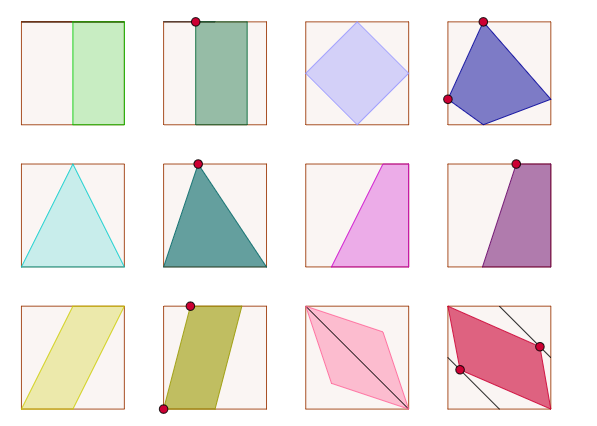
This example demonstrates geometric investigations on halving shapes using GeoGebra. Core math concepts include area, constructions, division, squares, differential calculus, triangles, complex numbers, etc. Construction highlights the use of commands and objects like Intersect, Point, Line, OrthogonalLine, Circle, Polygon, Vector, Translate, Segment, Midpoint, Ray. Suitable for high school mathematics teaching or geometric construction learning.
GeoGebra Commands & Parameters
Intersect(xAxis, yAxis) → APoint(xAxis) → BLine(A, B) → aOrthogonalLine(A, a) → bCircle(A, B) → cIntersect(c, b, 2) → COrthogonalLine(C, b) → dOrthogonalLine(B, a) → eIntersect(d, e) → DPolygon(A, B, D, C) → poly1, a_1, b_1, d_1, c_1Line(E, a_1) → fPoint(f) → FVector(E, F) → uOrthogonalLine(E, f) → gCircle(E, F) → hIntersect(h, g, 2) → GVector(E, G) → vTranslate(A, u) → A'Translate(B, u) → B'Translate(D, u) → D'Translate(C, u) → C'Polygon(A', B', D', C') → poly1', a', b', d', c'Translate(A', u) → A''Translate(B', u) → B''Translate(D', u) → D''Translate(C', u) → C''Polygon(A'', B'', D'', C'') → poly1'', a'', b'', d'', c''Translate(A, v) → A'_1Translate(B, v) → B'_1Translate(D, v) → D'_1Translate(C, v) → C'_1Polygon(A'_1, B'_1, D'_1, C'_1) → poly1'_1, a'_1, b'_1, d'_1, c'_1Translate(A', v) → A''_1Translate(B', v) → B''_1Translate(D', v) → D''_1Translate(C', v) → C''_1Polygon(A''_1, B''_1, D''_1, C''_1) → poly1''_1, a''_1, b''_1, d''_1, c''_1Translate(A'', v) → A'''Translate(B'', v) → B'''Translate(D'', v) → D'''Translate(C'', v) → C'''Polygon(A''', B''', D''', C''') → poly1''', a''', b''', d''', c'''Translate(D'_1, v) → D'_1'Translate(C'_1, v) → C'_1'Segment(D'_1', C'_1') → iTranslate(D'_1, v) → D'_2Translate(C'_1, v) → C'_2Segment(D'_2, C'_2) → jTranslate(A'_1, v) → A'_1'Translate(B'_1, v) → B'_1'Translate(D'_1, v) → D'_3Translate(C'_1, v) → C'_3Polygon(A'_1', B'_1', D'_3, C'_3) → poly1'_1', a'_1', b'_1', d'_3, c'_3Translate(A''_1, v) → A''_1'Translate(B''_1, v) → B''_1'Translate(D''_1, v) → D''_1'Translate(C''_1, v) → C''_1'Polygon(A''_1', B''_1', D''_1', C''_1') → poly1''_1', a''_1', b''_1', d''_1', c''_1'Translate(A''', v) → A''''Translate(B''', v) → B''''Translate(D''', v) → D''''Translate(C''', v) → C''''Polygon(A'''', B'''', D'''', C'''') → poly1'''', a'''', b'''', d'''', c''''Translate(A'', u) → A'''_1Translate(B'', u) → B'''_1Translate(D'', u) → D'''_1Translate(C'', u) → C'''_1Polygon(A'''_1, B'''_1, D'''_1, C'''_1) → poly1'''_1, a'''_1, b'''_1, d'''_1, c'''_1Translate(A''', u) → A''''_1Translate(B''', u) → B''''_1Translate(D''', u) → D''''_1Translate(C''', u) → C''''_1Polygon(A''''_1, B''''_1, D''''_1, C''''_1) → poly1''''_1, a''''_1, b''''_1, d''''_1, c''''_1Translate(A'''', u) → A'''''Translate(B'''', u) → B'''''Translate(D'''', u) → D'''''Translate(C'''', u) → C'''''Polygon(A''''', B''''', D''''', C''''') → poly1''''', a''''', b''''', d''''', c'''''Midpoint(i) → HMidpoint(a'_1') → IPolygon(H, D'_1', B'_1', I) → poly2, h_1, d'_1', b'_2, i_1Midpoint(d''_1') → JSegment(C''_1', J) → kPoint(k) → KCircle(K, m) → pIntersect(p, d''_1', 1) → LOrthogonalLine(K, k) → lOrthogonalLine(L, d''_1') → nIntersect(a''_1', l) → MIntersect(a''_1', n) → NPolygon(M, N, L, K) → poly3, m_1, n_1, l_1, k_1Midpoint(d'_1) → OPolygon(A'_1, O, B'_1) → poly4, b'_3, a'_2, oPoint(d''_1) → PPolygon(A''_1, P, B''_1) → poly5, b''_2, a''_2, p_1Midpoint(d_1) → QMidpoint(a_1) → RPolygon(A, Q, D, R) → poly6, a_2, q, d_2, rMidpoint(d') → SMidpoint(a') → TMidpoint(a_1) → USegment(C', S) → sSegment(T, A') → tPoint(s) → VPoint(t) → WCircle(V, m) → e_1Circle(W, m) → f_1Polygon(W, V, Z, A_1) → poly7, w, v_1, z, a_3Midpoint(D'', A'') → E_1Midpoint(A'', E_1) → F_1Midpoint(E_1, D'') → G_1Segment(C'', B'') → j_1Polygon(C'', F_1, B'', G_1) → poly8, c''_2, f_2, b''_3, g_2Midpoint(d'''_1) → H_1Midpoint(b'''_1) → I_1Midpoint(a'''_1) → J_1Midpoint(c'''_1) → K_1Segment(K_1, J_1) → q_1Segment(I_1, H_1) → r_1Point(q_1) → L_1Point(r_1) → M_1Polygon(C'''_1, L_1, B'''_1, M_1) → poly9, c'''_2, l_2, b'''_2, m_2Midpoint(d'''') → B_1Midpoint(c'''') → C_1Midpoint(a'''') → D_1Midpoint(b'''') → N_1Polygon(B_1, N_1, D_1, C_1) → poly10, b_2, n_2, d_3, c_2Point(d''''') → O_1Point(c''''') → P_1OrthogonalLine(P_1, c''''') → g_1OrthogonalLine(O_1, d''''') → s_1Intersect(a''''', s_1) → Q_1Intersect(b''''', g_1) → R_1Polygon(P_1, Q_1, R_1, O_1) → poly11, p_2, q_2, r_2, o_1Midpoint(d''') → S_1Midpoint(a''') → T_1Midpoint(S_1, D''') → U_1Midpoint(T_1, A''') → V_1Polygon(U_1, V_1, B''', D''') → poly12, u_1, v_2, b'''_3, d'''_2Point(d''''_1) → W_1Midpoint(A''''_1, D''''_1) → Z_1Ray(W_1, Z_1) → t_1Intersect(a''''_1, t_1) → A_2Polygon(A_2, B''''_1, D''''_1, W_1) → poly13, a_4, b''''_2, d''''_2, w_1
AI Drawing Prompt Reference
On a coordinate plane, start with a right triangle whose vertices are the origin, a point on the x-axis, and a third point found by drawing a circle centered at the origin through the x-axis point, then intersecting it with a line perpendicular to the hypotenuse through the origin. Complete this into a square. Next, construct a ray outside the square, pick a point on it, and use the vector from the origin to that point to translate the square twice, creating a row of three squares. Then, use a perpendicular vector to translate this entire row twice, forming a 3-by-3 grid of squares. Finally, connect two translated vertices at the grid's edge with two parallel segments, illustrating a halving construction.
The prompt above was compiled from the original drawing commands and is for reference only.