
GeoGebra Geometry Construction Example by GeoGebra Institute of Hong Kong
Loading the math board and drawing, please wait…
In collections
Symmetry, Transformation and Tessellation
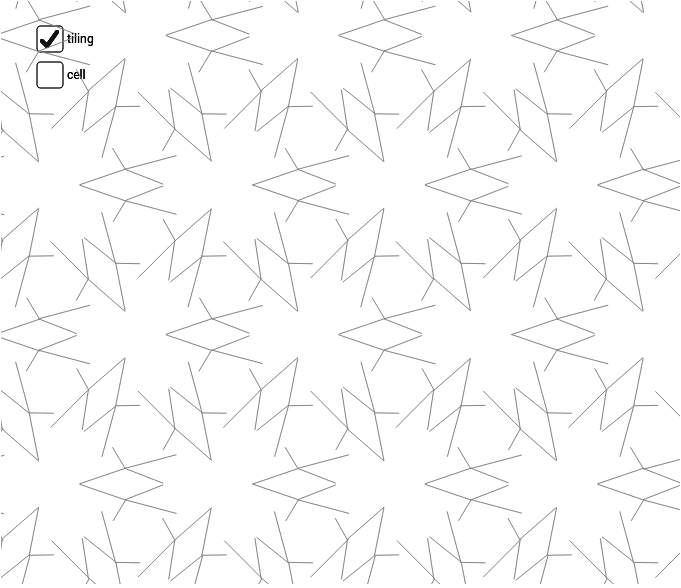
This example demonstrates the construction of complex geometric figures using GeoGebra commands. The math concepts involved include vectors, sequences, and geometric transformations. Key construction steps involve commands like Segment, Rotate, Midpoint, Mirror, Vector, Sequence, and Line. Suitable for high school and above students to understand the application of geometric constructions and transformations.
GeoGebra Commands & Parameters
Segment(C, B) → hSegment(L, M) → cSegment(M, N) → dSegment(M, P) → eSegment(M, Q) → fRotate(cell1a, 240*°, E) → cell1cRotate(cell1a, 120*°, E) → cell1bMidpoint(A, B) → HSegment(E, H) → bMirror(cell1, h) → cell2Midpoint(C, A) → GMidpoint(B, D) → IMidpoint(D, C) → JMidpoint(C, B) → KVector(A, B) → uVector(A, C) → vSegment(E, G) → aSequence(Translate[Sequence[Translate[tile, Vector[(n * u)]], n, -3, 3], Vector[(m * v)]], m, -3, 3) → tilingVector(B, D) → wVector(C, D) → gSegment(F, J) → jSegment(F, I) → kSegment(E, F) → iSegment(A, E) → pSegment(E, C) → qSegment(E, B) → rSegment(F, C) → sSegment(F, B) → tSegment(F, D) → a_1Line(C, B) → b_1Line(C, A) → c_1Line(A, B) → d_1Line(G, K) → e_1Line(K, H) → f_1Line(H, G) → g_1
AI Drawing Prompt Reference
Draw a complex geometric figure involving multiple line segments, midpoints, and vectors. Start with a basic shape, then create intricate geometric structures through rotations, reflections, and vector transformations. Use vectors to define a sequence, generating a series of translated shapes to demonstrate the application of geometric transformations. Finally, add auxiliary line segments and midpoints to complete the figure.
The prompt above was compiled from the original drawing commands and is for reference only.