
GeoGebra Example: Exploring Right Triangles and Volume
Loading the math board and drawing, please wait…
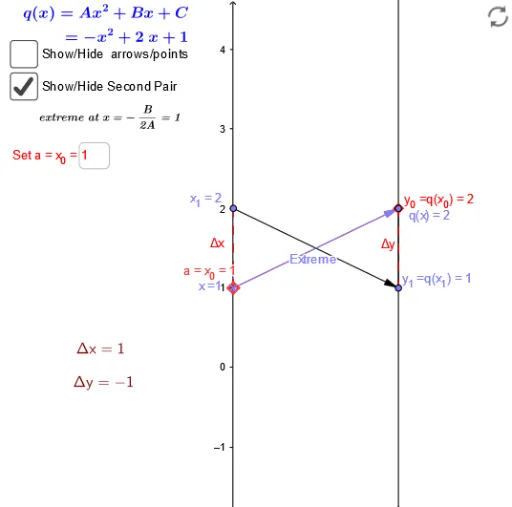
This example demonstrates how to construct right triangles and calculate their volumes using GeoGebra. The key mathematical concepts involved include the area formula for triangles, volume calculations, and exponent operations. Construction points include using commands like Vector, Segment, and Sequence to create geometric objects, and setting parameters via input boxes. Suitable for middle school or high school students to learn about combining geometry and algebra, and to master basic GeoGebra operations.
GeoGebra Commands & Parameters
Vector(A_1, B_1) → uTextfield(f) → inputBox1Vector(x_1, y_1) → vSegment(q_x, F) → cSegment(E, F) → dSegment(A_1, x_1) → eSegment(B_1, y_1) → gSegment(B_1, y_1) → h_1Sequence(Vector[(0, i), (2, f(i))], i, -3, 3, 1) → list1Sequence((i, f(i)), i, -3, 3, 1) → list2Vector(G, H) → ExtremeTextfield(C) → InputBox1Textfield(A) → InputBox2Textfield(B) → InputBox3Textfield(xx_0) → InputBox4
AI Drawing Prompt Reference
Draw a geometric figure combining right triangles and volume calculation. Start by constructing two right triangles, each with a vector as its hypotenuse, and connect corresponding vertices to complete the triangles. In the coordinate plane, generate a sequence of vectors and points from a function curve over x-values from -3 to 3, showing the function's shape. Add several input boxes to adjust triangle side lengths and function parameters. Finally, include a bold vector indicating the 'extreme' direction of the triangle, and label all vertices. The layout should clearly show the triangles, the function curve, and the parameter controls.
The prompt above was compiled from the original drawing commands and is for reference only.