
GeoGebra Equilateral Triangle Interactive Construction
Loading the math board and drawing, please wait…
In collections
The GeoGebra's Toolbox for Teachers and Students
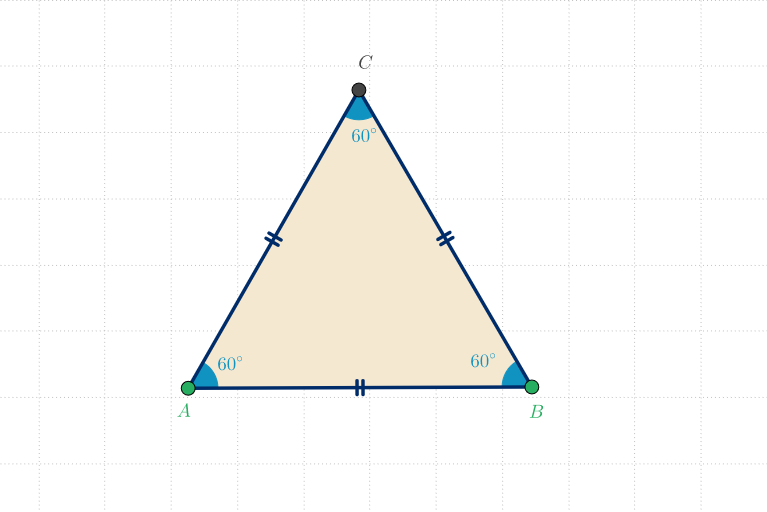
This GeoGebra example demonstrates how to construct a standard equilateral triangle. The core mathematical concepts include the properties of equilateral triangles: three equal sides and three 60° interior angles, as well as fundamental principles of plane geometry construction. Construction details: Use the Polygon command to create triangle poli1 with vertices A and B as endpoints, employ the Angle command to measure and display the three interior angles α, β, and γ. Verify the equilateral property by confirming a=b=c and α=β=γ=60°. Object list includes vertices A, B, C, sides a, b, c, and angles α, β, γ. This example is suitable for middle school geometry teaching, helping students observe equilateral triangle properties and understand basic geometric construction methods. It also serves as an introductory case for learning polygon and angle concepts.
GeoGebra Commands & Parameters
Polygon(A, B, 3) → poli1, a, b, c, CAngle(B, A, C) → αAngle(A, C, B) → γAngle(C, B, A) → β
AI Drawing Prompt Reference
Construct a standard equilateral triangle on a plane. Start by choosing two points to serve as the endpoints of the base, then form the triangle by defining the third vertex so the polygon has three equal sides. Display the three sides and measure the three interior angles, showing one interior angle at each vertex labeled α, β, and γ. The goal is to visually present the equilateral-triangle relationships between equal side lengths and the corresponding interior angles for basic plane-geometry learning.
The prompt above was compiled from the original drawing commands and is for reference only.