
GeoGebra Dilation: Parallelogram Scale Factor Demo
Loading the math board and drawing, please wait…
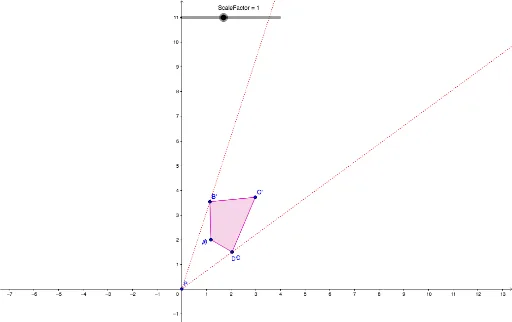
This example demonstrates how to perform dilation (scaling) transformation on a parallelogram using GeoGebra. By dragging the ScaleFactor slider, users can observe how the original parallelogram ABCD transforms into A'B'C'D'. Key mathematical concepts include dilation, similar figures, and scale factor. Construction details: ① Use Polygon command to draw parallelogram ABCD; ② Apply Dilate command with point P as center and ScaleFactor as ratio; ③ Create an adjustable scale factor parameter using Slider; ④ Use Ray command to draw rays through the dilation center for visual guidance. Suitable for middle to high school mathematics teaching, useful for understanding similarity transformations, homothetic figures, and proportional relationships, also serves as an interactive tool for exploring properties of scaling transformations.
GeoGebra Commands & Parameters
Polygon(A, B, C, D) → poly1, a, b, c, dDilate(A, ScaleFactor, P) → A'Dilate(B, ScaleFactor, P) → B'Dilate(C, ScaleFactor, P) → C'Dilate(D, ScaleFactor, P) → D'Polygon(A', B', C', D') → poly1', a', b', c', d'Ray(P, B) → eRay(P, D) → f
AI Drawing Prompt Reference
Draw a parallelogram with four vertices connected in order. Choose a point outside the parallelogram as the center of dilation. Using an adjustable scale factor, transform each vertex by moving it along the line from the center through the original vertex, creating a new set of four vertices. Connect these new vertices to form a second parallelogram. Draw two rays from the center through two adjacent vertices of the original parallelogram for visual guidance. As the scale factor changes, the two parallelograms remain similar, with corresponding vertices aligned with the center.
The prompt above was compiled from the original drawing commands and is for reference only.