
GeoGebra Constructions Example
Loading the math board and drawing, please wait…
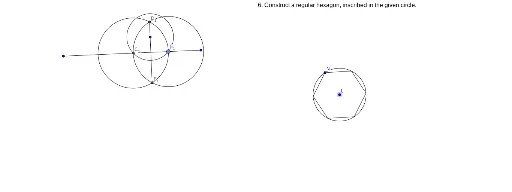
This example demonstrates precise geometric constructions using GeoGebra, involving core math concepts like geometric construction, angle measurement, and intersection of segments and circles. Key GeoGebra commands and objects used include Angle, Segment, Point, Circle, Intersect, and Ray, as listed in the construction summary. Suitable for high school mathematics instruction or for enthusiasts learning geometric drawing techniques and tool usage.
GeoGebra Commands & Parameters
Angle(A, B, C) → αSegment(A, B) → aSegment(B, C) → bSegment(D, E) → cSegment(F, G) → dSegment(H, I) → ePoint(e) → JSegment(H_1, I_1) → e_1Circle(L, N) → fPoint(a) → OCircle(B, O) → gIntersect(g, b, 1) → PCircle(P, Segment[O, P]) → hCircle(O, Segment[O, P]) → kIntersect(h, k, 2) → QRay(B, R) → iRay(B, Q) → jCircle(E, Segment[D, E]) → pCircle(D, Segment[E, D]) → qIntersect(p, q, 2) → SIntersect(p, q, 1) → TSegment(S, T) → mCircle(G, Segment[F, G]) → rCircle(F, Segment[G, F]) → sIntersect(r, s, 2) → USegment(U, F) → lSegment(U, G) → nPoint(e) → VCircle(J, V) → tIntersect(t, e, 2) → WCircle(V, W) → c_1Circle(W, V) → d_1Intersect(c_1, d_1, 2) → ZIntersect(c_1, d_1, 1) → A_1Segment(Z, A_1) → f_1Point(e_1) → B_1Circle(K, B_1) → g_1Intersect(g_1, e_1, 2) → C_1Circle(B_1, Segment[C_1, B_1]) → h_1Circle(C_1, Segment[B_1, C_1]) → k_1Intersect(h_1, k_1, 2) → D_1Intersect(h_1, k_1, 1) → E_1Segment(D_1, E_1) → i_1Circle(N, Segment[L, N]) → p_1Intersect(f, p_1, 1) → F_1Intersect(f, p_1, 2) → G_1Circle(F_1, Segment[L, F_1]) → q_1Circle(G_1, Segment[G_1, L]) → r_1Intersect(f, q_1, 1) → J_1Intersect(f, r_1, 2) → K_1Circle(J_1, Segment[L, J_1]) → s_1Circle(K_1, Segment[L, K_1]) → t_1Intersect(f, s_1, 1) → L_1Circle(L_1, Segment[L, L_1]) → c_2Segment(F_1, N) → j_1Segment(N, G_1) → l_1Segment(G_1, K_1) → m_1Segment(K_1, L_1) → n_1Segment(L_1, J_1) → a_1Segment(J_1, F_1) → b_1