
Geoboard Area 5B: Exploring Polygon and Circle Areas
Loading the math board and drawing, please wait…
In collections
Geoboard Area
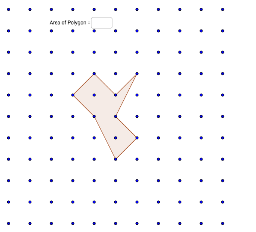
This GeoGebra example uses a geoboard to construct polygons and dynamically compute their areas using the Polygon, Textfield, and Area commands. It demonstrates how polygon areas relate to circles, trapezoids, and quadratic functions. Core math concepts include area formulas for polygons, circles, and trapezoids, as well as the role of quadratic functions in area variation. The construction involves creating a polygon (poly1) by connecting geoboard points (e.g., G_3, A_3, L_1) with the Polygon command, using Textfield for numeric input, and Area to calculate the area in real time. It is suitable for upper elementary to middle school students learning area calculations, geometric properties, and the integration of functions with geometry. It can be used for classroom demonstrations or student-led exploration of area formula derivations.
GeoGebra Commands & Parameters
Polygon(J_1, I_2, L_1, G_3, E_3, C_3, A_3, I) → poly1, j_1, i_2, l_1, g_3, e_3, c_1, a_3, iTextfield() → InputBox1Area(poly1) → polyArea
AI Drawing Prompt Reference
On a geoboard grid, connect a series of grid points in order to form an irregular polygon that spans multiple cells. Place a text input box nearby for entering numeric values. Then, compute and display the polygon's area in real time, updating as the vertices or input values change. The construction is designed to explore how polygon areas relate to circles, trapezoids, and quadratic functions, suitable for classroom demonstrations or student-led investigations of area formulas.
The prompt above was compiled from the original drawing commands and is for reference only.