
From Scenarios to Equations: Linear Equations & Inequalities
Loading the math board and drawing, please wait…
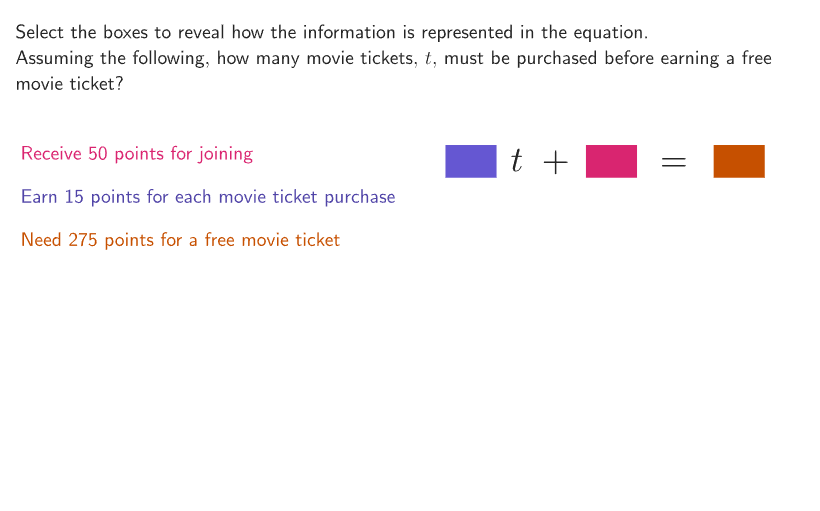
This interactive GeoGebra activity demonstrates how to translate real-world scenarios into mathematical equations step by step. Students practice writing and solving linear equations based on practical problems such as savings goals (e.g., starting with $30, needing $350 after 5 weeks, how much to save each week?). Key mathematical concepts include formulating linear equations from word problems, solving single-variable equations, and applying inequality reasoning. Construction highlights: uses Shuffle for random scenario generation, Sequence for number patterns, Text for displaying problems, Polygon for visual representations, and slider animations for interactive exploration. Designed for grades 6-8, ideal for developing algebraic thinking and mathematical modeling skills.
GeoGebra Commands & Parameters
Shuffle(Sequence[3]) → randomSituation, {3, 1, 2}Corner(5) → AppSizeShuffle({{1, 2, 3}, {1, 3, 2}, {2, 1, 3}, {2, 3, 1}, {3, 1, 2}, {3, 2, 1}}) → randomOrderCB, {{1, 2, 3}, {2, 3, 1}, {3, 1, 2}, {3, 2, 1}, {1, 3, 2}, {2, 1, 3}}Element(randomOrderCB, Mod[example, Length[randomOrderCB]] + 1) → orderCBElement(randomSituation, Mod[example, Length[randomSituation]] + 1) → situationZip((kk, 0), kk, If[situation ≟ 1, {3.2, 2.5, 3}, situation ≟ 2, {1.8, 3, 2}, {1.8, 1.3, 1.3}]) → xcoordsTranslate(hGuideline, Vector[(Vector[Corner[4], Corner[1]] / 500 * 16)]) → hGuideline'Sequence(yFirstCB + (ii * (26 + 16)), ii, 0, 2) → ycoordsCB, {138, 180, 222}Zip(XX + YY - (0.8, 0), XX, xcoords, YY, ycoords) → departureSort(Zip[(kk, -0.5), kk, {If[situation ≟ 1, 7.5, 8], 10.75, 13.25}], {2, 1, 3}) → arrivalSemicircle(A1, D1) → c1Semicircle(A2, D2) → c2Semicircle(A3, D3) → c3Point(c1, anim2) → Panim1Point(c2, anim1) → Panim2Point(c3, anim3) → Panim3Text((("\" * Element[sizes, floor((anim2 * 3)) + 1]) * initialValues(situation)), Panim1, true, true, 1, 1) → animtext1Text((("\" * Element[sizes, floor((anim1 * 3)) + 1]) * rates(situation)), Panim2, true, true, 1, 1) → animtext2Text((("\" * Element[sizes, floor((anim3 * 3)) + 1]) * finalvalues(situation)), Panim3, true, true, 1, 1) → animtext3Polygon({arrival(1), arrival(1) + (wid, 0), arrival(1) + (wid, hei), arrival(1) + (0, hei)}) → q2Polygon({arrival(2), arrival(2) + (wid, 0), arrival(2) + (wid, hei), arrival(2) + (0, hei)}) → q1Polygon({arrival(3), arrival(3) + (wid, 0), arrival(3) + (wid, hei), arrival(3) + (0, hei)}) → q3Text(equation, PointEq, true, true, -1, -1) → equationPosPolygon({Vertex[q2, 1] + ((-disth), (-distv)), Vertex[q2, 2] + (disth, (-distv)), Vertex[q2, 3] + (disth, distv), Vertex[q2, 4] + ((-disth), distv)}) → q2whitePolygon({Vertex[q2, 1] + ((-2 * disth), (-2 * distv)), Vertex[q2, 2] + ((2 * disth), (-2 * distv)), Vertex[q2, 3] + ((2 * disth), (2 * distv)), Vertex[q2, 4] + ((-2 * disth), (2 * distv))}) → q2SelectedPolygon({Vertex[q1, 1] + ((-disth), (-distv)), Vertex[q1, 2] + (disth, (-distv)), Vertex[q1, 3] + (disth, distv), Vertex[q1, 4] + ((-disth), distv)}) → q1whitePolygon({Vertex[q1, 1] + ((-2 * disth), (-2 * distv)), Vertex[q1, 2] + ((2 * disth), (-2 * distv)), Vertex[q1, 3] + ((2 * disth), (2 * distv)), Vertex[q1, 4] + ((-2 * disth), (2 * distv))}) → q1SelectedPolygon({Vertex[q3, 1] + ((-2 * disth), (-2 * distv)), Vertex[q3, 2] + ((2 * disth), (-2 * distv)), Vertex[q3, 3] + ((2 * disth), (2 * distv)), Vertex[q3, 4] + ((-2 * disth), (2 * distv))}) → q3SelectedPolygon({Vertex[q3, 1] + ((-disth), (-distv)), Vertex[q3, 2] + (disth, (-distv)), Vertex[q3, 3] + (disth, distv), Vertex[q3, 4] + ((-disth), distv)}) → q3white
AI Drawing Prompt Reference
Create an infographic style figure with three side-by-side semi-circular markers. Draw three semicircles first, then place three labeled points on them and attach three lines of text near each point whose content changes according to one of three scenario values (matching starting value, weekly rate, and final value). At the bottom, construct three rectangular regions aligned with the three options, and for each region add a normal white outline plus a larger highlighted/selected outline. Show the visual correspondence between the animated points on the semicircles and the bottom rectangles as the figure transitions between positions.
The prompt above was compiled from the original drawing commands and is for reference only.