
From Parallelograms to Triangles: Dynamic Area Exploration
Loading the math board and drawing, please wait…
In collections
Grade 6 Unit 1: Area and Surface Area
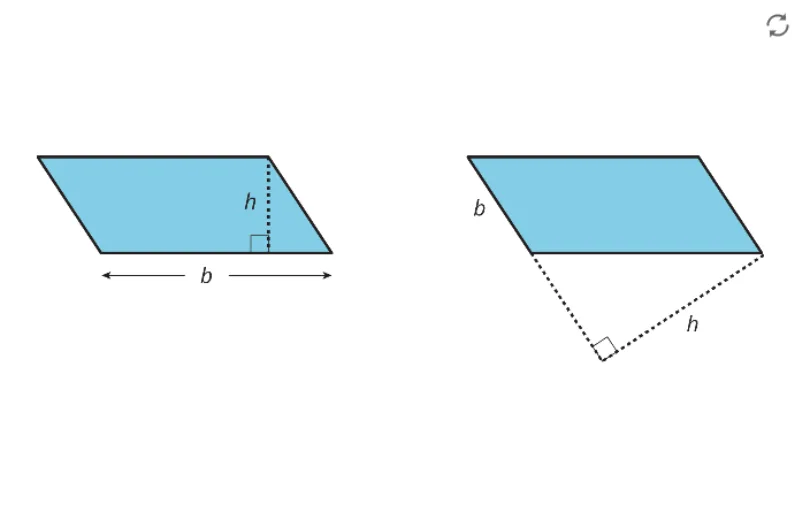
This GeoGebra example demonstrates the geometric relationship between parallelograms and triangles, showing how a parallelogram can be decomposed or transformed into triangles sharing the same base and height. Core mathematics concepts include parallelograms, triangles, area formulas, base and height, polygon properties, and geometric decomposition. The construction uses GeoGebra commands Segment and Polygon, with points A through M and objects such as poly1, f, g, h, i, j, k, l, m, n, p, q, r to build dynamic polygonal figures and line segments. It is designed for middle-school mathematics instruction (grades 6–8), supporting teachers in lesson preparation and students in independent exploration of plane figure area relationships.
GeoGebra Commands & Parameters
Segment(A, B) → fSegment(B, C) → gSegment(C, A) → hPolygon(A, C, B) → t1, b, a, cSegment(D, E) → iSegment(E, F) → jSegment(F, G) → kSegment(G, D) → lPolygon(D, E, F, G) → q1, d, e, f_1, g_1Segment(H, I) → mSegment(I, J) → nSegment(J, K) → pSegment(K, L) → qSegment(L, H) → rPolygon(H, I, J, K, L) → poly1, h_1, i_1, j_1, k_1, l_1Segment(M, N) → sSegment(N, O) → tSegment(O, P) → m_1Segment(P, Q) → n_1Segment(Q, R) → p_1Segment(R, M) → q_1Polygon(R, M, N, O, P, Q) → poly2, r_1, m_2, n_2, o, p_2, q_2Segment(S, T) → s_1Segment(T, U) → t_1Segment(U, V) → a_1Segment(V, W) → b_1Segment(W, Z) → c_1Segment(Z, A_1) → d_1Segment(A_1, S) → e_1Polygon(S, T, U, V, W, Z, A_1) → poly3, s_2, t_2, u, v, w, z_1, f_2Segment(B_1, C_1) → g_2Segment(C_1, D_1) → h_2Segment(D_1, E_1) → i_2Segment(E_1, F_1) → j_2Segment(F_1, G_1) → k_2Segment(G_1, H_1) → l_2Segment(H_1, I_1) → r_2Segment(I_1, B_1) → a_2Polygon(B_1, C_1, D_1, E_1, F_1, G_1, H_1, I_1) → poly4, b_2, c_2, d_2, e_2, f_3, g_3, h_3, i_3Segment(J_1, K_1) → j_3Segment(K_1, L_1) → k_3Segment(L_1, M_1) → l_3Segment(M_1, N_1) → m_3Segment(N_1, O_1) → n_3Segment(O_1, P_1) → p_3Segment(P_1, Q_1) → q_3Segment(Q_1, R_1) → r_3Segment(R_1, J_1) → s_3Polygon(R_1, J_1, K_1, L_1, M_1, N_1, O_1, P_1, Q_1) → poly5, t_3, a_3, b_3, c_3, d_3, e_3, o_1, f_4, g_4Segment(S_1, T_1) → h_4Segment(T_1, U_1) → i_4Segment(U_1, V_1) → j_4Segment(V_1, W_1) → k_4Segment(W_1, Z_1) → l_4Segment(Z_1, A_2) → m_4Segment(A_2, B_2) → n_4Segment(B_2, C_2) → p_4Segment(C_2, D_2) → q_4Segment(D_2, S_1) → r_4Polygon(S_1, T_1, U_1, V_1, W_1, Z_1, A_2, B_2, C_2, D_2) → poly6, s_4, e_4, t_4, u_1, v_1, w_1, a_4, b_4, c_4, d_4
AI Drawing Prompt Reference
Draw a parallelogram ABCD, then decompose it into two triangles, one with base AB and height AD, the other with base BC and height CD. Next, draw a pentagon DEFGH and decompose it into two triangles, one with base DE and height DF, the other with base GH and height GH. Finally, draw a hexagon MNOPQR and decompose it into two triangles, one with base MN and height MP, the other with base QR and height QR.
The prompt above was compiled from the original drawing commands and is for reference only.