
Fragment, Bridget Riley Math Example
Loading the math board and drawing, please wait…
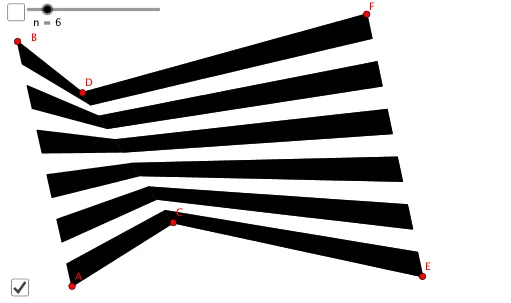
This example demonstrates the construction and dynamic variation of fractal geometric figures based on straight lines. It involves core mathematical concepts such as trigonometry, rational numbers, fractal geometry, median line, and kite. GeoGebra commands like Segment and Sequence are used in the construction process. Suitable for high school and above mathematics learners and those interested in geometric art exploration.
GeoGebra Commands & Parameters
Segment(A, B) → fSegment(C, D) → gSegment(E, F) → hSequence(((1 - i / ((2 * n) - 1)) * A) + (i / ((2 * n) - 1) * B), i, 0, (2 * n) - 1) → l1Sequence(((1 - i / ((2 * n) - 1)) * C) + (i / ((2 * n) - 1) * D), i, 0, (2 * n) - 1) → l2Sequence(((1 - i / ((2 * n) - 1)) * E) + (i / ((2 * n) - 1) * F), i, 0, (2 * n) - 1) → l3Sequence(Polygon[Element[l1, (2 * i) - 1], Element[l1, (2 * i)], Element[l2, (2 * i)], Element[l2, (2 * i) - 1]], i, 1, n) → l4Sequence(Polygon[Element[l3, (2 * i) - 1], Element[l3, (2 * i)], Element[l2, (2 * i)], Element[l2, (2 * i) - 1]], i, 1, n) → l5Sequence(((1 - i / ((2 * n) - 1)) * G) + (i / ((2 * n) - 1) * H), i, 0, (2 * n) - 1) → l6Sequence(Polygon[Element[l3, (2 * i) - 1], Element[l3, (2 * i)], Element[l6, (2 * i)], Element[l6, (2 * i) - 1]], i, 1, n) → l7
AI Drawing Prompt Reference
Draw a fractal geometric figure based on straight lines, showing dynamic variation. Start by drawing three line segments as a foundation, then generate three sets of interpolated line segments. Use these to construct a series of kite-shaped polygons, combining them with another line segment to form a complex fractal pattern, highlighting the application of trigonometry and rational numbers in geometric construction.
The prompt above was compiled from the original drawing commands and is for reference only.