
Fractions on a Number Line: Interactive Visualization
Loading the math board and drawing, please wait…
In collections
CBSE Class VI Maths
Fraction Book
Fraction Skills
Fraction Book
Decimals and Fractions
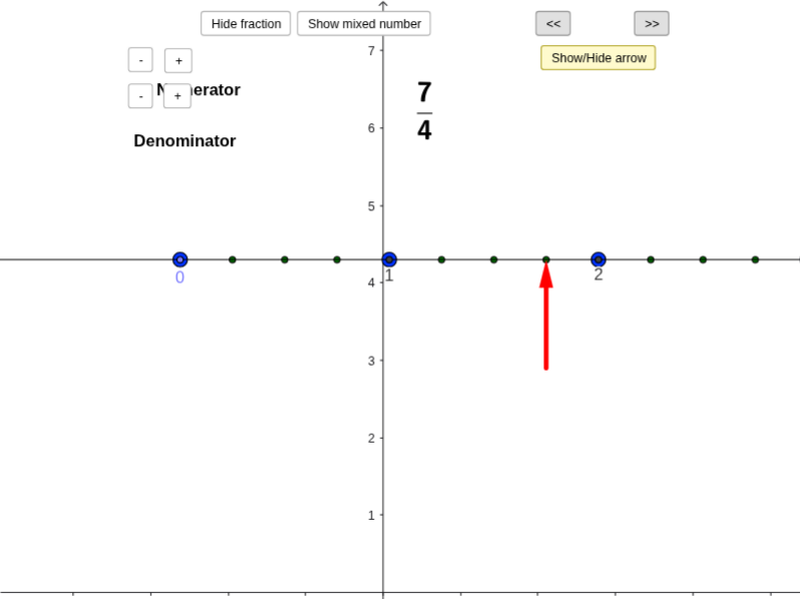
This GeoGebra example demonstrates how fractions are placed on a number line, showing unit intervals, numerator/denominator relationships, improper fractions, and mixed-number representations. It covers fraction meaning, number-line coordinates, unit fractions, equal partitioning, scaling, and conversion between improper fractions and mixed numbers. The construction uses Point and Sequence to create tick points and fractional divisions, Vector and arrowlength to draw indicator arrows, and objects such as numerator, denominator, numberofwholes, totaldots, and denomsize to control values. Mod and Element manage cyclic lists list1/list2, while numeratorup/down, denominatorup/down, setfraction, zoomadd/subtract provide interactive adjustment and zooming; fractionlabelonnumberline, mixedwhole, mixednumerator, and answermixed display labels and mixed-number results. It is suitable for upper elementary and middle school fraction instruction, number-line activities, and GeoGebra lesson development.
GeoGebra Commands & Parameters
Point(a) → ASequence((x(A) + (i * denomsize), y(A)), i, 1, totaldots) → list2Sequence((x(A) + (i * unitsize), y(A)), i, 0, numberofwholes) → list1Vector(C, B) → uElement(list1, 2) → DElement(list1, 3) → EElement(list1, 4) → FElement(list1, 5) → GElement(list1, 6) → HElement(list1, 7) → IElement(list1, 8) → JElement(list1, 9) → KElement(list1, 10) → LElement(list1, 11) → MMod(numerator, denominator) → mixednumerator
AI Drawing Prompt Reference
Draw a number line from 0 to 1, with marks at every 1/5 interval, and use arrows to indicate 1/5, 2/5, 3/5, 4/5, and 5/5. Show the numerator and denominator for each fraction, and display the result as a mixed number.
The prompt above was compiled from the original drawing commands and is for reference only.