
Fractions and Attached Text in GeoGebra
Loading the math board and drawing, please wait…
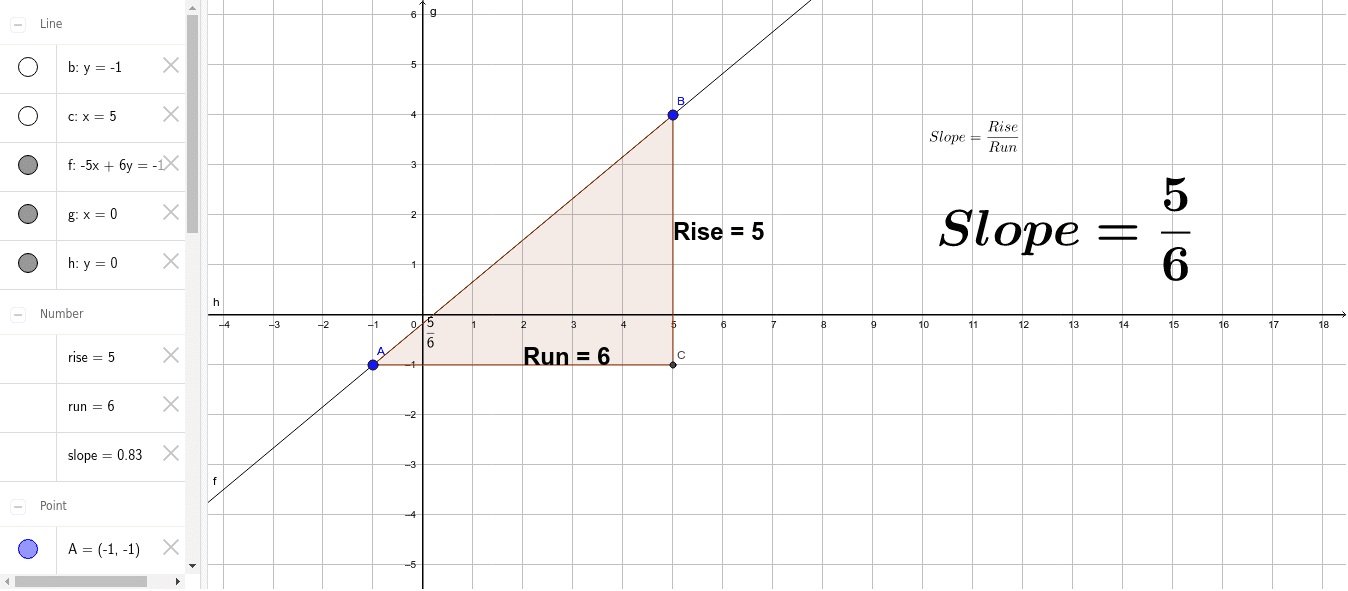
This example demonstrates how to draw fraction-related graphics and attach text annotations in GeoGebra. It involves core math concepts like fractions, rational numbers, symmetry, definite integrals, distributions, and division. Key GeoGebra commands/objects used include Line, OrthogonalLine, Intersect, Polygon, SurdText, and Midpoint. Suitable for high school mathematics teaching or self-learning, focusing on the integration of fractions and geometric shapes.
GeoGebra Commands & Parameters
Line(A, B) → fOrthogonalLine(A, g) → bOrthogonalLine(B, h) → cIntersect(b, c) → CPolygon(A, C, B) → poly1, b_1, a, c_1SurdText(slope) → text4Midpoint(a) → DMidpoint(b_1) → E
AI Drawing Prompt Reference
Draw a right triangle with two lines perpendicular to points A and B, intersecting at point C. Then draw a triangle with vertices at points A, C, and B, and label the square root of the slope inside the triangle. Finally, mark the midpoints D and E on the two medians of the triangle.
The prompt above was compiled from the original drawing commands and is for reference only.