
Fraction Visualizer
Loading the math board and drawing, please wait…
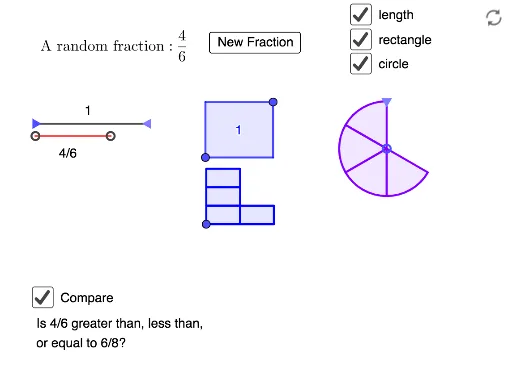
This example dynamically demonstrates how fractions can be visualized through geometric areas, illustrating the relationship between fractions and shapes. It involves core math concepts like fractions, area, incircle, circumcircle, parametric curves, and stochastic processes. Construction highlights the use of commands like RandomElement, Random, Point, Segment, Polygon, Midpoint, Defined, If, Sequence, Translate. Suitable for middle school and above, aiding in understanding fractions, geometry, and parametric equations.
GeoGebra Commands & Parameters
RandomElement(l1) → aRandomElement(l1) → bRandom(1, a) → cRandomElement(l2) → ePoint(Ray[A, A + (1, 0)]) → BSegment(A, B) → fSegment(E, C) → gPolygon(F, (x(G), y(F)), G, (x(F), y(G))) → q1, f_1, i, g_1, jMidpoint(g) → HDefined(IndexOf[D, l3]) → kIf(¬k, Midpoint[I, F], I) → KIf(¬k, F + (2 / D * (J - F)), F + (1 / D * (J - F))) → LPolygon(F, K, M, L) → q2, f_2, k_1, m, lSequence(Polygon[Translate[F, (i * (L - F))], Translate[K, (i * (L - F))], Translate[M, (i * (L - F))], Translate[L, (i * (L - F))]], i, 0, If[k, N, Min[N, D / 2]] - 1) → l4If((¬k) ∧ N > D / 2, Sequence[Translate[Polygon[Translate[F, K - F], Translate[K, K - F], Translate[M, K - F], Translate[L, K - F]], (i * (L - F))], i, 0, N - D / 2 - 1]) → l5Point(Ray[O, O + (0, 1)]) → PSequence(Rotate[CircleSector[O, P, Rotate[P, (360°) / D, O]], (i * (360°) / D), O], i, 0, N - 1) → l6Translate({l4, l5}, Q - F) → l7