
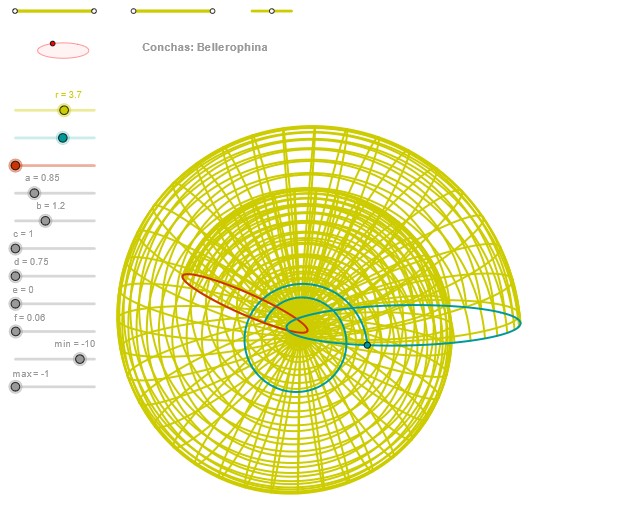
Concha (Bellerophina) Shell Curve Geometric Construction
Loading the math board and drawing, please wait…
In collections
geometriadinamica.es
① This example demonstrates how to construct a beautiful shell-like curve resembling the Bellerophina concha through a series of geometric constructions and parametric equations. ② Core mathematical concepts include parametric curves, intersections of ellipses and circles, orthogonal lines, angle measurement, and sequence generation, incorporating combinatorial percentages and arithmetic operations, reflecting the fusion of geometry and algebra. ③ Construction highlights: From the construction summary, commands such as Segment, Point, OrthogonalLine, Circle, Intersect, Ellipse, Angle, CurveCartesian, and Sequence are used. Multiple auxiliary points (e.g., P1-P4, Q1-Q4) and lines are defined to progressively establish the parametric relationships, finally plotting the curve with CurveCartesian and generating dynamic sequences with Sequence. ④ Suitable for high school or early college students, this example is ideal for exploring parametric curves, geometric construction, and mathematical aesthetics, serving as a mathematical experiment or art-mathematics lesson to understand how parametric equations can be derived from geometric constraints.
GeoGebra Commands & Parameters
Segment(Q3, Q4) → p2Point(p2) → P3Segment(P3, Q4) → p4Point(p4) → P4Segment(Q1, Q2) → p1Point(p1) → P1Segment(P1, Q2) → p3Point(p3) → P2OrthogonalLine(C, yAxis) → zz1Circle(C, 0.62) → zz0Intersect(zz0, zz1, 1) → ZZ1Intersect(zz0, zz1, 2) → ZZ2Ellipse(ZZ1, ZZ2, 0.65) → zElipse1Intersect(zElipse1, zz1) → ZZ5, ZZ6Point(zElipse1) → XYAngle(ZZ6, C, XY) → zAngRotOrthogonalLine(C, xAxis) → zz2Intersect(zz0, zz2, 2) → ZZ3Intersect(zz0, zz2, 1) → ZZ4Ellipse(ZZ3, ZZ4, 0.65) → zElipse2Intersect(zElipse2, zz2) → ZZ7, ZZ8Point(zElipse2) → ZAngle(ZZ8, C, Z) → zAngIncSegment(Q5, Q6) → p5Point(p5) → P5Segment(ZZ5, ZZ6) → zz4Segment(ZZ7, ZZ8) → zz3Intersect(zElipse2, zElipse1, 1) → zPunto1Intersect(zElipse2, zElipse1, 4) → zPunto2Segment(zPunto1, zPunto2) → zSeg2CurveCartesian((r * ((((exp((f * u)) * (d + (a * cos(α)))) * cos((c * u))) * sin(zAngRot)) + (((exp((f * u)) * (d + (a * cos(α)))) * sin((c * u))) * cos(zAngRot)))), (r * ((((((-exp((f * u))) * (d + (a * cos(α)))) * cos((c * u))) * cos(zAngRot)) * sin(zAngInc)) + ((((exp((f * u)) * (d + (a * cos(α)))) * sin((c * u))) * sin(zAngRot)) * sin(zAngInc)) + ((exp((f * u)) * ((-1.4 * e) + (b * sin(α)))) * cos(zAngInc)))), u, u1, u2) → curva2CurveCartesian((r * ((((exp((f * β)) * (d + (a * cos(v)))) * cos((c * β))) * sin(zAngRot)) + (((exp((f * β)) * (d + (a * cos(v)))) * sin((c * β))) * cos(zAngRot)))), (r * ((((((-exp((f * β))) * (d + (a * cos(v)))) * cos((c * β))) * cos(zAngRot)) * sin(zAngInc)) + ((((exp((f * β)) * (d + (a * cos(v)))) * sin((c * β))) * sin(zAngRot)) * sin(zAngInc)) + ((exp((f * β)) * ((-1.4 * e) + (b * sin(v)))) * cos(zAngInc)))), v, v1, v2) → a1CurveCartesian((r * ((((exp((f * max)) * (d + (a * cos(v)))) * cos((c * max))) * sin(zAngRot)) + (((exp((f * max)) * (d + (a * cos(v)))) * sin((c * max))) * cos(zAngRot)))), (r * ((((((-exp((f * max))) * (d + (a * cos(v)))) * cos((c * max))) * cos(zAngRot)) * sin(zAngInc)) + ((((exp((f * max)) * (d + (a * cos(v)))) * sin((c * max))) * sin(zAngRot)) * sin(zAngInc)) + ((exp((f * max)) * ((-1.4 * e) + (b * sin(v)))) * cos(zAngInc)))), v, v1, v2) → curva1Sequence(CurveCartesian[(r * ((((exp((f * u)) * (d + (a * cos(v)))) * cos((c * u))) * sin(zAngRot)) + (((exp((f * u)) * (d + (a * cos(v)))) * sin((c * u))) * cos(zAngRot)))), (r * ((((((-exp((f * u))) * (d + (a * cos(v)))) * cos((c * u))) * cos(zAngRot)) * sin(zAngInc)) + ((((exp((f * u)) * (d + (a * cos(v)))) * sin((c * u))) * sin(zAngRot)) * sin(zAngInc)) + ((exp((f * u)) * ((-1.4 * e) + (b * sin(v)))) * cos(zAngInc)))), v, v1, v2], u, u1, u2, paso) → list2Sequence(CurveCartesian[(r * ((((exp((f * u)) * (d + (a * cos(v)))) * cos((c * u))) * sin(zAngRot)) + (((exp((f * u)) * (d + (a * cos(v)))) * sin((c * u))) * cos(zAngRot)))), (r * ((((((-exp((f * u))) * (d + (a * cos(v)))) * cos((c * u))) * cos(zAngRot)) * sin(zAngInc)) + ((((exp((f * u)) * (d + (a * cos(v)))) * sin((c * u))) * sin(zAngRot)) * sin(zAngInc)) + ((exp((f * u)) * ((-1.4 * e) + (b * sin(v)))) * cos(zAngInc)))), u, u1, u2], v, v1, v2, paso) → list1
AI Drawing Prompt Reference
Draw a shell-like curve resembling a Bellerophina concha. The curve is generated from intersections of ellipses and circles. Auxiliary points, circles, and ellipses are constructed to determine rotation angles. The parametric equation combines exponential functions, trigonometric functions, and angle parameters to produce a dynamic, shell-shaped figure. The construction order: first establish auxiliary points and circles to obtain intersection points; then construct ellipses and find their intersections; measure angles; finally plot the curve using parametric equations and generate a sequence. This geometric construction merges algebra and geometry to create an aesthetically pleasing parametric curve.
The prompt above was compiled from the original drawing commands and is for reference only.