
Fraction Strip Comparison: Exploring Fraction Size and Equivalence
Loading the math board and drawing, please wait…
In collections
Zahlenstrahl und Ordnen von Brüchen
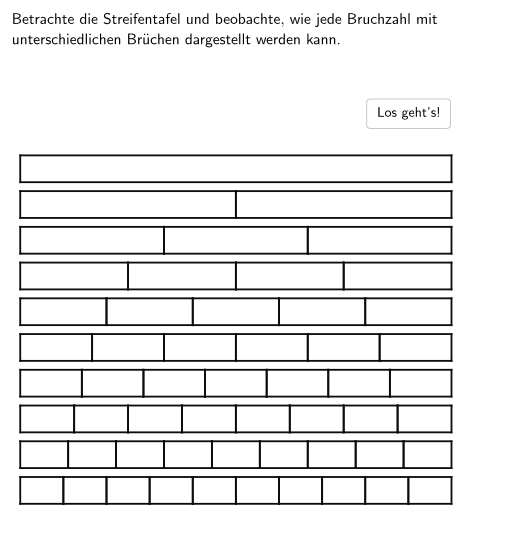
This GeoGebra example uses an interactive 'fraction strip' (Streifentafel) to help students visually compare the sizes of fractions. The strip is divided into equal parts, and students can move an orange marker to locate a specific fraction, then observe the length of the corresponding segment to determine whether the fraction is smaller or larger than a reference value (e.g., 1/2). Core mathematical concepts include relative size of fractions, fractions as parts of a whole, equivalent fractions (e.g., 2/4 = 1/2), and strategies for comparing fractions. Construction highlights: the applet uses GeoGebra commands such as Polygon, Point, Line, Intersect, Segment, OrthogonalLine, and If to build the strip, division lines, markers, and dynamic feedback; objects include multiple points (e.g., A82, B82) and segments, with conditional logic for interactivity. Suitable for grades 5-6, this resource supports classroom exploration and practice, helping students develop number sense and reasoning about fraction comparison and equivalence.
GeoGebra Commands & Parameters
Polygon(AA3, AA4, AA15, AA14) → VA3, h, a4, a15, iPoint(yAxis) → BLine(B, xAxis) → n_5Point(n_5) → EIntersect(n_5, yAxis) → DSegment(D, E) → q_5Polygon(AA1, AA2, AA13, AA12) → VA1, a1, a2, a13, a12Polygon(AA2, AA3, AA14, AA13) → VA2, f, a3, a14, gPolygon(AA4, AA5, AA16, AA15) → VA4, j, a5, a16, kPolygon(AA5, AA6, AA17, AA16) → VA5, l, a6, a17, mPolygon(AA6, AA7, AA18, AA17) → VA6, n, a7, a18, pPolygon(AA7, AA8, AA19, AA18) → VA7, q, a8, a19, rPolygon(AA8, AA9, AA20, AA19) → VA8, s, a9, a20, tPolygon(AA9, AA10, AA21, AA20) → VA9, a23, a10, a21, cPolygon(AA10, AA11, AA22, AA21) → VA10, d, a11, a22, ePolygon(AC1, AC2, AC12, AC11) → VC1, a_1, b_1, l_1, k_1Polygon(AC2, AC3, AC13, AC12) → VC2, b_2, c_1, m_1, l_2Polygon(AC3, AC4, AC14, AC13) → VC3, c_2, d_1, n_1, m_2Polygon(AC4, AC5, AC15, AC14) → VC4, d_2, e_1, o, n_2Polygon(AC5, AC6, AC16, AC15) → VC5, e_2, f_1, p_1, o_1Polygon(AC6, AC7, AC17, AC16) → VC6, f_2, g_1, q_1, p_2Polygon(AC7, AC8, AC18, AC17) → VC7, g_2, h_1, r_1, q_2Polygon(AC8, AC9, AC19, AC18) → VC8, h_2, i_1, a24, r_2Polygon(AC9, AC10, AC20, AC19) → VC9, i_2, j_1, t_1, s_2Polygon(AE1, AE2, AE11, AE10) → VE1, e1, e2, e11, e10Polygon(AE2, AE3, AE12, AE11) → VE2, s_1, e3, e12, j_2Polygon(AE3, AE4, AE13, AE12) → VE3, k_2, e4, e13, t_2Polygon(AE4, AE5, AE14, AE13) → VE4, a_2, e5, e14, f_3Polygon(AE5, AE6, AE15, AE14) → VE5, g_3, e6, e15, h_3Polygon(AE6, AE7, AE16, AE15) → VE6, i_3, e7, e16, j_3Polygon(AE7, AE8, AE17, AE16) → VE7, k_3, e8, e17, l_3Polygon(AE8, AE9, AE18, AE17) → VE8, m_3, e9, e18, n_3Polygon(AG1, AG2, AG10, AG9) → VG1, g1, g2, g10, g9Polygon(AG2, AG3, AG11, AG10) → VG2, p_3, g3, g11, q_3Polygon(AG3, AG4, AG12, AG11) → VG3, r_3, g4, g12, s_3Polygon(AG4, AG5, AG13, AG12) → VG4, t_3, g5, g13, a_3Polygon(AG5, AG6, AG14, AG13) → VG5, b_3, g6, g14, c_3Polygon(AG6, AG7, AG15, AG14) → VG6, d_3, g7, g15, e_3Polygon(AG7, AG8, AG16, AG15) → VG7, f_4, g8, g16, g_4Polygon(AI1, AI2, AI9, AI8) → VI1, i1, i2, i9, i8Polygon(AI2, AI3, AI10, AI9) → VI2, h_4, i3, i10, i_4Polygon(AI3, AI4, AI11, AI10) → VI3, j_4, i4, i11, k_4Polygon(AI4, AI5, AI12, AI11) → VI4, l_4, i5, i12, m_4Polygon(AI5, AI6, AI13, AI12) → VI5, n_4, i6, i13, p_4Polygon(AI6, AI7, AI14, AI13) → VI6, q_4, i7, i14, r_4Polygon(AK1, AK2, AK8, AK7) → VK1, k1, k2, k8, k7Polygon(AK2, AK3, AK9, AK8) → VK2, s_4, k3, k9, t_4Polygon(AK3, AK4, AK10, AK9) → VK3, a_4, k4, k10, b_4Polygon(AK4, AK5, AK11, AK10) → VK4, c_4, k5, k11, d_4Polygon(AK5, AK6, AK12, AK11) → VK5, e_4, k6, k12, f_5Polygon(AM1, AM2, AM7, AM6) → VM1, m1, m2, m7, m6Polygon(AM2, AM3, AM8, AM7) → VM2, g_5, m3, m8, h_5Polygon(AM3, AM4, AM9, AM8) → VM3, i_5, m4, m9, j_5Polygon(AM4, AM5, AM10, AM9) → VM4, k_5, m5, m10, l_5Polygon(AO1, AO2, AO6, AO5) → VO1, a_5, b_5, f_6, e_5Polygon(AO2, AO3, AO7, AO6) → VO2, b_6, c_5, g_6, f_7Polygon(AO3, AO4, AO8, AO7) → VO3, c_6, d_5, h_6, g_7Polygon(AQ1, AQ2, AQ5, AQ4) → VQ1, a_6, b_7, e_6, d_6Polygon(AQ2, AQ3, AQ6, AQ5) → VQ2, b_8, c_7, f_8, e_7Polygon(AS1, AS2, AS4, AS3) → VS1, a_7, b_9, d_7, c_8Point(Alle) → AOrthogonalLine(A, xAxis) → m_5Intersect(m_5, xAxis) → CIf(Lineal ≟ A3, true) → ZweiZehntelIf(Lineal ≟ E3, true) → ZweiAchtelIf(Lineal ≟ I3, true) → ZweiSechstelIf(Lineal ≟ A5, true) → VierZehntelIf(Lineal ≟ A6, true) → FünfZehntelIf(Lineal ≟ A7, true) → SechsZehntelIf(Lineal ≟ I5, true) → VierSechstelIf(Lineal ≟ E7, true) → SechsAchtelIf(Lineal ≟ A9, true) → AchtZehntelIf(Lineal ≟ S2, true) → GanzesPolygon(B_8, C_8, D_8, E_8) → v1, r_5, s_5, d_8, e_8Segment(A, C_{42}) → p_5
AI Drawing Prompt Reference
Draw a fraction strip graphic: divide a long line segment into equal parts, and place a movable orange marker line on it. Students can move the marker to observe the length of the corresponding segment and compare it with a reference value (e.g., 1/2). The graphic should include the concept of equivalent fractions, such as 2/4 and 1/2 representing the same length. Construct by first drawing the long strip, then adding equal division lines and the marker line, and finally adding a reference line for comparison.
The prompt above was compiled from the original drawing commands and is for reference only.