
Fraction Multiplication - Tablet App Friendly
Loading the math board and drawing, please wait…
In collections
Working with fractions
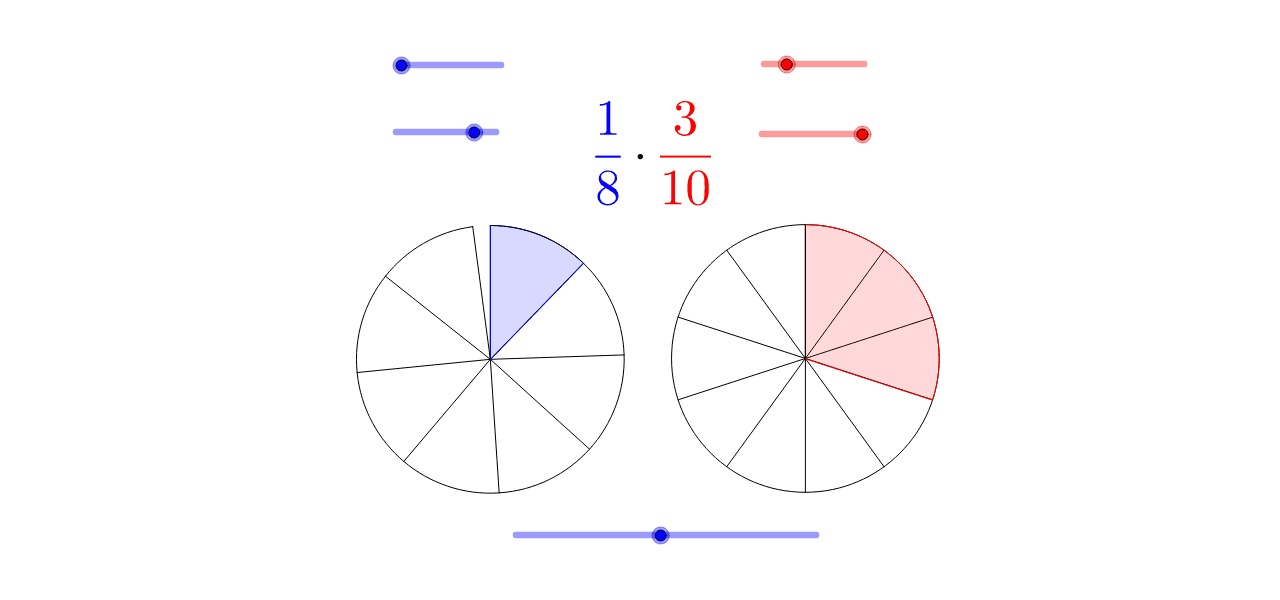
This example dynamically demonstrates the process of fraction multiplication to help students understand the concept. Key mathematical concepts include fractions and multiplication. Using GeoGebra commands such as Max, Min, If, and Sequence, students can visually see the results of fraction multiplication. Suitable for high-grade elementary and junior high school students.
GeoGebra Commands & Parameters
Max(0, abs(t) - 5) → ntMin(nt, 100) → t1Max(0, nt - 100) → t2If(b, BA, AA) → CIf(b, 1, (den1 - (ts * (den1 - en1))) / den1) → f1Sequence(Segment[B, Rotate[B1, ((((-f1) * 2) * π) * i / den2), B]], i, 0, den2 - 1) → list2CircleArc(B, Rotate[B1, (((-2) * π) * f1), B], B1) → fSegment(B, Rotate[B1, (((-2) * π) * f1), B]) → aCircleSector(B, Rotate[B1, ((((-f1) * 2) * π) * en2 / den2), B], B1) → dSequence(Segment[C, Rotate[C1, ((2 * π) * i / den3), C]], i, 1, den3 - 1) → list3If(b, (den2 - (ts * (den2 - en2))) / den2, 1) → f2CircleSector(A, Rotate[A1, ((((-f2) * 2) * π) * en1 / den1), A], A1) → cSequence(Segment[A, Rotate[A1, ((((-f2) * 2) * π) * i / den1), A]], i, 0, den1 - 1) → list1CircleArc(A, Rotate[A1, (((-2) * π) * f2), A], A1) → eSegment(A, Rotate[A1, (((-2) * π) * f2), A]) → g
AI Drawing Prompt Reference
Create a dynamic illustration showing the process of fraction multiplication, including the product of two fractions, visualized through rotating and segmenting line segments. Start by drawing the base shapes, then rotate and draw multiple line segments and sectors based on the fraction values, finally connecting all parts to form a complete figure that demonstrates the geometric meaning of fraction multiplication.
The prompt above was compiled from the original drawing commands and is for reference only.