
Fraction Multiplication GeoGebra Example
Loading the math board and drawing, please wait…
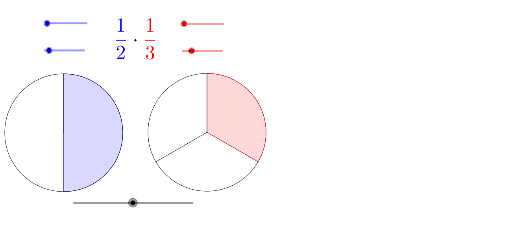
This example demonstrates the process of fraction multiplication. Key mathematical concepts include fraction multiplication. Using GeoGebra commands such as Max, Min, If, Sequence, etc., it dynamically illustrates the geometric meaning of fraction multiplication. Suitable for high-grade elementary or junior high school students to learn fraction operations.
GeoGebra Commands & Parameters
Max(0, abs(t) - 5) → ntMin(nt, 100) → t1Max(0, nt - 100) → t2If(b, BA, AA) → CIf(b, 1, (den1 - (ts * (den1 - en1))) / den1) → f1Sequence(Segment[B, Rotate[B1, ((((-f1) * 2) * π) * i / den2), B]], i, 0, den2 - 1) → list2CircleArc(B, Rotate[B1, ((-2 * π) * f1), B], B1) → fSegment(B, Rotate[B1, ((-2 * π) * f1), B]) → aCircleSector(B, Rotate[B1, ((((-f1) * 2) * π) * en2 / den2), B], B1) → dSequence(Segment[C, Rotate[C1, ((2 * π) * i / den3), C]], i, 1, den3 - 1) → list3If(b, (den2 - (ts * (den2 - en2))) / den2, 1) → f2CircleSector(A, Rotate[A1, ((((-f2) * 2) * π) * en1 / den1), A], A1) → cSequence(Segment[A, Rotate[A1, ((((-f2) * 2) * π) * i / den1), A]], i, 0, den1 - 1) → list1CircleArc(A, Rotate[A1, ((-2 * π) * f2), A], A1) → eSegment(A, Rotate[A1, ((-2 * π) * f2), A]) → g
AI Drawing Prompt Reference
Draw a dynamic illustration showing the process of fraction multiplication, including two parts: the left side uses sectors and line segments to represent the result of fraction multiplication, and the right side uses rotating line segments and arcs to demonstrate the geometric meaning, with dynamic changes through parameters, suitable for students learning fraction operations.
The prompt above was compiled from the original drawing commands and is for reference only.