
Fraction Multiplication by Stephen Jull
Loading the math board and drawing, please wait…
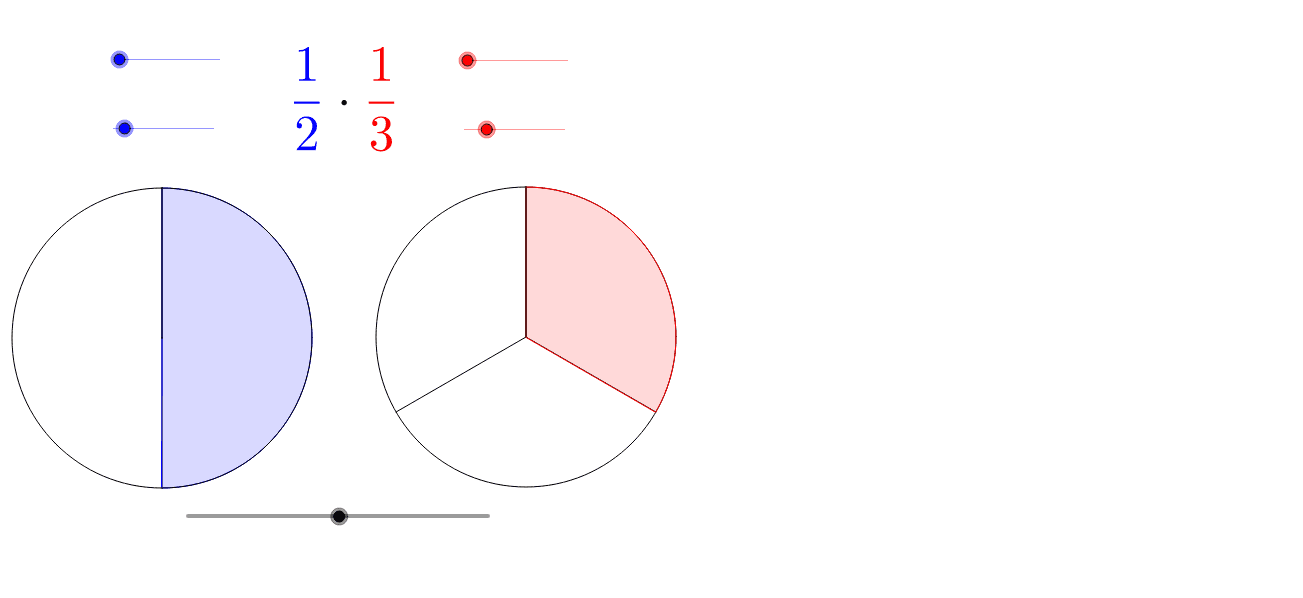
This example demonstrates the calculation and geometric interpretation of fraction multiplication using sliders. It involves core concepts like fraction operations, geometric area relationships, and stochastic processes. GeoGebra commands such as Max, Min, If, Sequence, CircleArc, Segment, and CircleSector are used to construct the visuals and animations. Suitable for middle school students and above to learn fraction multiplication and geometric intuition, or for introductory probability and statistics teaching.
GeoGebra Commands & Parameters
Max(0, abs(t) - 5) → ntMin(nt, 100) → t1Max(0, nt - 100) → t2If(b, BA, AA) → CIf(b, 1, (den1 - ts * (den1 - en1)) / den1) → f1Sequence(Segment[B, Rotate[B1, -f1 * 2 * π * i / den2, B]], i, 0, den2 - 1) → list2CircleArc(B, Rotate[B1, -2 * π * f1, B], B1) → fSegment(B, Rotate[B1, -2 * π * f1, B]) → aCircleSector(B, Rotate[B1, -f1 * 2 * π * en2 / den2, B], B1) → dSequence(Segment[C, Rotate[C1, 2 * π * i / den3, C]], i, 1, den3 - 1) → list3If(b, (den2 - ts * (den2 - en2)) / den2, 1) → f2CircleSector(A, Rotate[A1, -f2 * 2 * π * en1 / den1, A], A1) → cSequence(Segment[A, Rotate[A1, -f2 * 2 * π * i / den1, A]], i, 0, den1 - 1) → list1CircleArc(A, Rotate[A1, -2 * π * f2, A], A1) → eSegment(A, Rotate[A1, -2 * π * f2, A]) → g
AI Drawing Prompt Reference
Demonstrate fraction multiplication with sliders, showing geometric area relationships. Adjust parameters using max and min functions to draw sectors and arcs representing fractions. Animate the rotation process, including multiple sectors, arcs, and connecting line segments, suitable for learning fraction multiplication and geometric intuition.
The prompt above was compiled from the original drawing commands and is for reference only.