
Fraction Extension Practice
Loading the math board and drawing, please wait…
In collections
Bruchzahlen: Erweitern und Kürzen
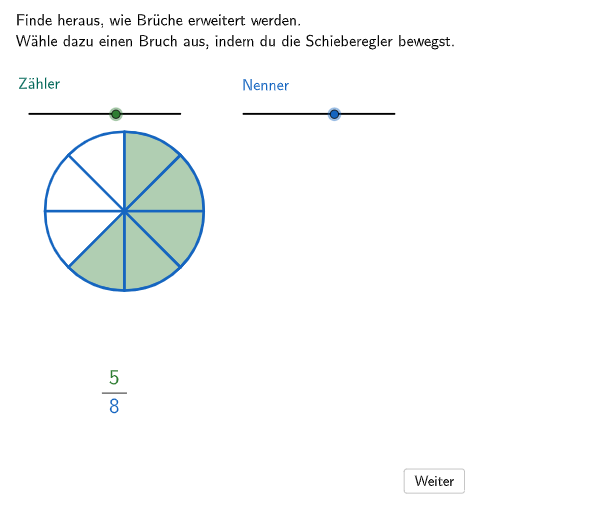
This example demonstrates the concept of fraction extension, involving core mathematical concepts such as the basic properties and methods of fractions. Using GeoGebra commands like Join, Sequence, Point, etc., students can visually understand the process of fraction extension. Suitable for students in grades 5-6, it helps them master the methods of extending and simplifying fractions.
GeoGebra Commands & Parameters
Join({{"$\textsf{\vphantom{Äg}\phantom{=}}$"}, Sequence[(("$\textsf{\vphantom{Äg}" * AufgabenText(i)) * "}$"), i, 1, CountIf[x ≠ "" ∨ x ≠ 0, AufgabenText]]}) → LDP1Sequence(Random[2, 12], i, 1, 100) → randomNenner, {5, 2, 12, 2, 12, 10, 11, 12, 7, 4, 2, 8, 10, 6, 10, 12, 7, 9, 10, 6, 3, 10, 5, 12, 3, 2, 3, 5, 2, 8, 5, 12, 8, 5, 7, 7, 9, 7, 5, 11, 4, 11, 2, 2, 6, 2, 11, 6, 7, 4, 8, 9, 12, 11, 7, 8, 12, 2, 3, 7, 7, 2, 11, 11, 6, 12, 2, 6, 7, 7, 7, 5, 6, 6, 12, 5, 8, 3, 3, 8, 10, 12, 3, 7, 9, 4, 6, 3, 4, 8, 3, 8, 5, 10, 6, 10, 9, 2, 7, 7}Sequence(Random[2, nenner2 - 1], i, 1, 100) → randomZaehler, {7, 3, 5, 7, 2, 6, 6, 2, 3, 4, 6, 7, 4, 3, 3, 5, 7, 4, 3, 5, 5, 6, 4, 6, 7, 3, 6, 4, 2, 2, 5, 3, 6, 5, 2, 7, 3, 2, 7, 3, 5, 4, 7, 2, 5, 3, 7, 3, 6, 5, 6, 2, 7, 5, 6, 7, 5, 2, 2, 6, 7, 7, 5, 6, 5, 5, 6, 5, 4, 6, 2, 3, 2, 6, 4, 4, 3, 5, 4, 5, 7, 5, 7, 6, 6, 4, 5, 4, 7, 3, 7, 6, 3, 2, 4, 4, 2, 2, 2, 4}Sequence(I + ((i * widthNennerBar / 12) * (1, 0)), i, 1, 12) → allowedPositionsNennerBarPoint(allowedPositionsNennerBar) → PNennerCircle(M, B) → cSegment(M, M + (Radius[c] * (0, 1))) → fVector(F, G) → uSegment(H, H + (widthZaehlerBar * (1, 0))) → gSegment(I, I + (widthNennerBar * (1, 0))) → hSequence(H + ((i * widthZaehlerBar / 12) * (1, 0)), i, 0, nenner2) → allowedPositionsZaehlerBarPoint(allowedPositionsZaehlerBar) → PZaehlerSequence(Rotate[f, ((i * 2) * pi / nenner2), M], i, 0, nenner2 - 1) → l1Sequence(CircleSector[M, Rotate[KreisOben, (((-(i + 1)) * 2) * pi / nenner2), M], Rotate[KreisOben, (((-i) * 2) * pi / nenner2) - 0.0001, M]], i, 0, zaehler2 - 1) → l2Sequence(Random[1, zaehler2 - 1], i, 1, 100) → randomSubtrahend, {4, 1, 4, 3, 2, 2, 4, 3, 4, 1, 2, 4, 3, 2, 2, 2, 4, 4, 1, 3, 2, 2, 3, 2, 1, 2, 2, 4, 2, 3, 2, 1, 3, 4, 3, 1, 3, 1, 2, 2, 3, 2, 3, 4, 1, 4, 1, 1, 3, 4, 3, 4, 4, 1, 1, 4, 1, 4, 3, 1, 3, 4, 2, 1, 1, 3, 1, 1, 3, 1, 3, 3, 1, 3, 4, 2, 1, 1, 3, 4, 3, 3, 4, 4, 3, 4, 3, 4, 2, 3, 2, 4, 1, 2, 1, 2, 2, 4, 4, 1}Center(sektor12v1) → M12v1Center(sektor12v2) → M12v2Center(sektor12v3) → M12v3Center(sektor12v4) → M12v4Center(sektor12v5) → M12v5Center(sektor12v6) → M12v6Center(sektor12v7) → M12v7Center(sektor12v8) → M12v8Center(sektor12v9) → M12v9Center(sektor12v10) → M12v10Center(sektor12v11) → M12v11Center(sektor12v12) → M12v12Textfield(input1) → Eingabefeld1Textfield(input2) → Eingabefeld2Join({{"$\textsf{\vphantom{Äg}Wähle aus!}$"}, Sequence[(("$\textsf{\vphantom{Äg}" * AufgabenText(i)) * "}$"), i, 1, CountIf[x ≠ "" ∨ x ≠ 0, AufgabenText]]}) → LDP1_{1}Join({{"$\textsf{\vphantom{Äg}Wähle aus!}$"}, Sequence[(("$\textsf{\vphantom{Äg}" * AufgabenText(i)) * "}$"), i, 1, CountIf[x ≠ "" ∨ x ≠ 0, AufgabenText]]}) → LDP2Point(xAxis) → JOrthogonalLine(J, xAxis) → iPoint(xAxis) → KLineBisector(K, J) → jTranslate({l2}, (dxBruch2, 0)) → showBruch201Sequence(Rotate[f, ((i * 2) * pi / ((verfeinerung * nenner2))), M], i, 0, (verfeinerung * nenner2) - 1) → l3Translate({l3}, (dxBruch2, 0)) → showBruch202Translate({c, l1}, (dxBruch2, 0)) → showBruch203LaTeX(step, true, true) → Text5CircleArc(O, N, PosBogerl) → bogerl11Point(bogerl11) → PVector(P, N + (0.1 * Vector[P, N])) → bogerl1pfeilTranslate({bogerl11, bogerl1pfeil}, (0, 0)) → bogen1OrthogonalLine(Q, yAxis) → kMirror(bogen1(1), k) → bogen1'Point(bogen1') → RPoint(bogen1') → SVector(R, S + (0.1 * Vector[R, S])) → vPoint(bogen1') → TIf(step ≟ 3, SelectedIndex[LDP1] ≠ 1, false) → fixedSectorsIf(step ≟ 3, SelectedIndex[LDP1] ≟ 1, step ≟ 4, false, true) → showpart2
AI Drawing Prompt Reference
Create a visual representation of fraction extension, illustrating the basic properties and methods of fractions. Include a coordinate axis, a circle, and multiple sectors. The sectors are arranged through rotation and translation, forming a geometric representation of a fraction. There is a center point on the circle, with points and line segments on its circumference, having specific positional relationships. The sectors overlap and are spaced apart, forming the overall fraction representation. Start by drawing the coordinate axis and circle, then add points and line segments on the circle, rotate and move the sectors, and finally adjust their positional relationships.
The prompt above was compiled from the original drawing commands and is for reference only.