
Fraction Division: Visualizing Partitive and Quotative Models
Loading the math board and drawing, please wait…
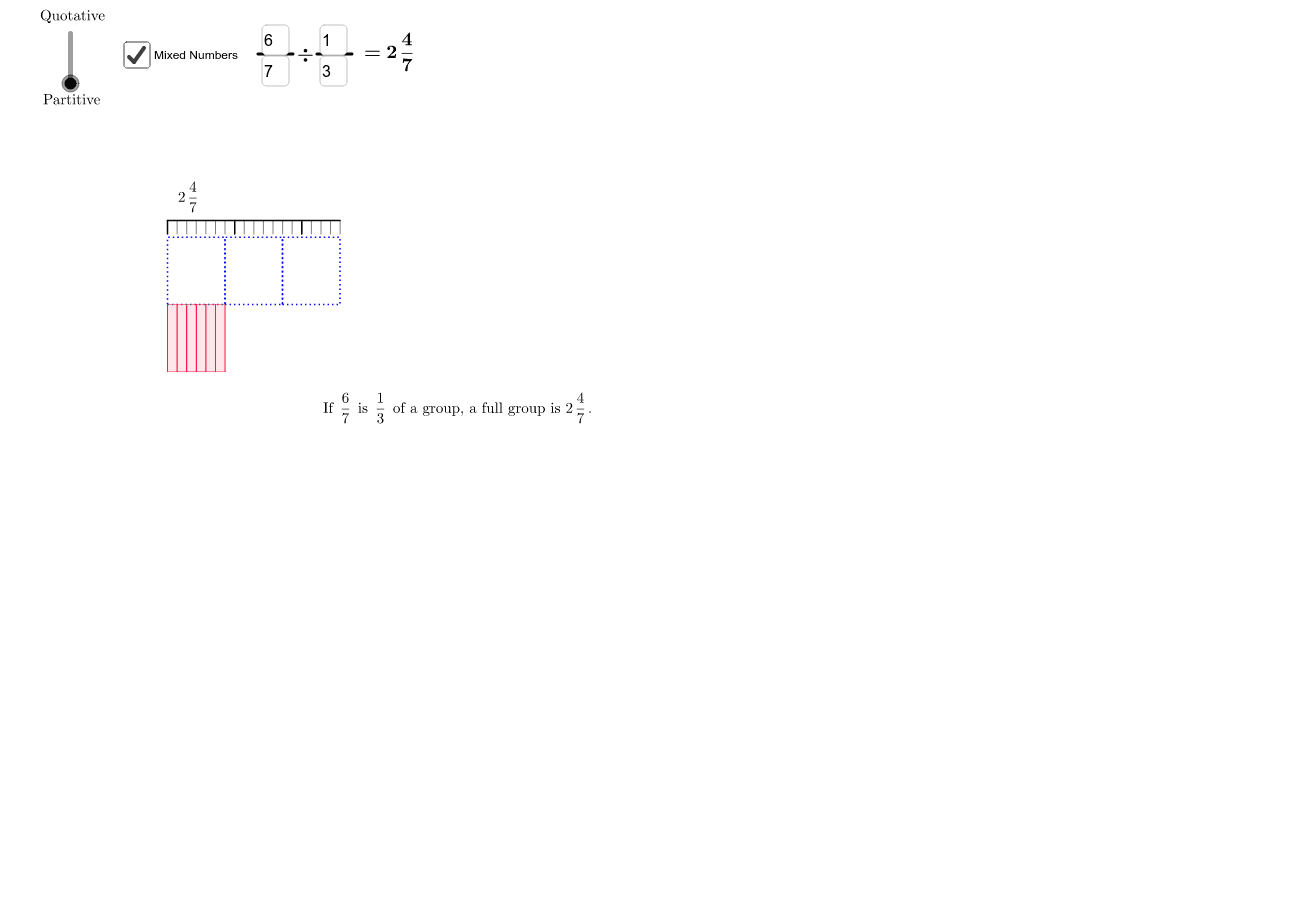
① This GeoGebra example dynamically illustrates two classic interpretations of fraction division: partitive (sharing) and quotative (measurement) division, making the meaning of 'dividing by a fraction' visually concrete. ② Core mathematical concepts include fraction arithmetic, division models, unit fractions, conversion between mixed numbers and improper fractions, and the relationship between fractions and integer ratios. ③ Construction highlights: using Textfield and AttachCopyToView for input boxes, If and FractionText for dynamic fraction labels, Polygon, Sequence, and Segment to draw partitioned shapes, with stroke1 and related objects showing the division process; lists (list1, list2, etc.) and loop variables (i, j, k, l) control the number of partitions, while quotfrac and quotmixed display the quotient. ④ Suitable for upper elementary to middle school students learning fraction division, and for teachers demonstrating how the algorithm 'multiply by the reciprocal' arises from visual models.
GeoGebra Commands & Parameters
Textfield(a) → inputBox1Textfield(b) → inputBox2Textfield(c) → inputBox3Textfield(d) → inputBox4AttachCopyToView(PolyLine[(0.86, 5.22), (0.96, 5.22), (1.06, 5.22), (1.1400000000000001, 5.22), (1.22, 5.22), (1.3, 5.22), (1.4000000000000001, 5.22), (1.48, 5.22), (1.56, 5.22), true], 1, (-4.3, -2.56), (7.0600000000000005, 6.3), (1.1102230246251565E-14, 442.99999999999994), (568, 5.6843418860808015E-14)) → stroke1AttachCopyToView(PolyLine[(0.86, 5.22), (0.96, 5.22), (1.06, 5.22), (1.1400000000000001, 5.22), (1.22, 5.22), (1.3, 5.22), (1.4000000000000001, 5.22), (1.48, 5.22), (1.56, 5.22), true], 1, (-4.3, -2.56), (7.0600000000000005, 6.3), (58.99999999999998, 442.99999999999994), (627, 5.5067062021407764E-14)) → stroke1_1If((b ≠ 0) ∧ (c ≠ 0) ∧ (d ≠ 0), a / b / (c / d), "undefined") → quotFractionText(quot) → text3If(Defined[quot] ≠ true, "undefined", If[floor(quot) ≟ quot, FractionText[quot], LaTeX[FractionText[floor(quot)] + (FractionText[quot - floor(quot)])]]) → quotmixedPolygon((0, 0), (a / b, 0), (a / b, 1), (0, 1)) → list1, i, j, k, lIf(f ≟ 1, Sequence[Polygon[((i * c / d), 1), (((i + 1) * c / d), 1), (((i + 1) * c / d), 2), ((i * c / d), 2)], i, 0, floor(quot) - 1]) → list2If(f ≟ 1 ∧ (floor(quot) < quot), Sequence[Polygon[((floor(quot) * c / d) + (i / ((b * c / GCD[(a * d), (b * c)])) * c / d), 1), ((floor(quot) * c / d) + ((i + 1) / ((b * c / GCD[(a * d), (b * c)])) * c / d), 1), ((floor(quot) * c / d) + ((i + 1) / ((b * c / GCD[(a * d), (b * c)])) * c / d), 2), ((floor(quot) * c / d) + (i / ((b * c / GCD[(a * d), (b * c)])) * c / d), 2)], i, 0, (b * c / GCD[(a * d), (b * c)]) - 1]) → list4Sequence(Segment[(i / b, 0), (i / b, 1)], i, 0, a) → list3Segment((0, 1), (a / b, 1)) → gSegment((0, 0), (a / b, 0)) → hFractionText(a / b) → abFractionText(c / d) → cdFractionText(quot) → quotfracIf(f ≟ -1, Sequence[Polygon[((i * a / ((b * c))), 1), (((i + 1) * a / ((b * c))), 1), (((i + 1) * a / ((b * c))), 2), ((i * a / ((b * c))), 2)], i, 0, d - 1]) → list5If(f ≟ -1, Segment[(0, 2.25), (quot, 2.25)]) → mIf(f ≟ -1, Segment[(0, 2.05), (0, 2.25)]) → nIf(f ≟ -1, Sequence[Segment[(i, 2.05), (i, 2.25)], i, 1, If[floor(quot) < quot, floor(quot), quot - 1]]) → list6If(f ≟ -1, Sequence[Segment[(i / ((b * c / GCD[(a * d), (b * c)])), 2.05), (i / ((b * c / GCD[(a * d), (b * c)])), 2.25)], i, 1, (a * d / GCD[(a * d), (b * c)])]) → list7If(f ≟ -1 ∧ floor(quot) ≟ quot, Segment[(quot, 2.05), (quot, 2.25)]) → p
AI Drawing Prompt Reference
Create an interactive diagram illustrating two models of fraction division: partitive and quotative. Place four input boxes at the top for entering numerators and denominators of two fractions. Below, draw a rectangle whose width represents the first fraction, divided into equal vertical segments. Based on the division result, draw a series of smaller rectangles above or beside it, showing how the second fraction is repeated or subdivided. Display the quotient as both a fraction and a mixed number. The diagram should update dynamically with input changes and clearly label each part with its corresponding fraction.
The prompt above was compiled from the original drawing commands and is for reference only.