
Fraction Division to Decimal Practice
Loading the math board and drawing, please wait…
In collections
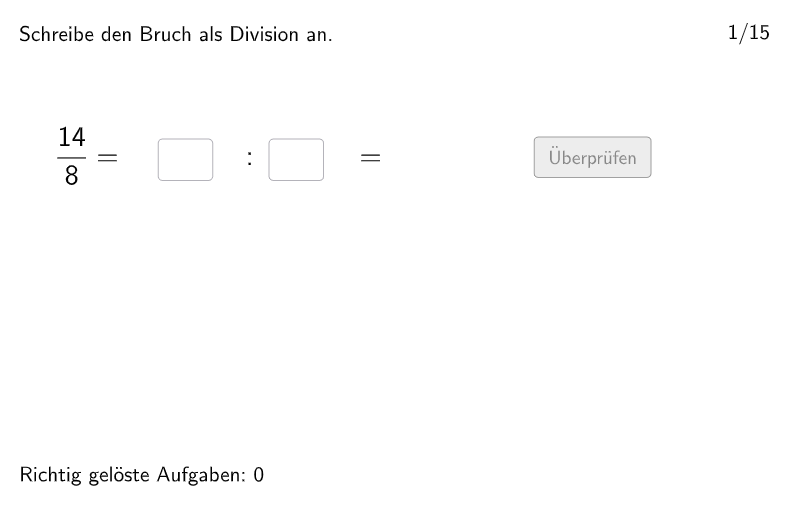
Bruch als Division
This is an interactive mathematics exercise demonstrating how to convert fractions to decimal form. Students enter the dividend and divisor through input boxes, and the system automatically calculates and displays the result as a decimal. The core mathematical concept is understanding fractions as quotients, where fraction a/b represents the quotient of a divided by b. Construction highlights: using GeoGebra's Textfield and InputBox commands to create the input interface with real-time feedback; employing Point command to plot results on the coordinate plane; utilizing Shuffle and Element commands to randomize exercise questions. Suitable for Grade 5-6 students (German Schulstufe 5-6), serving as a classroom or homework resource for number sense and fraction operations practice.
GeoGebra Commands & Parameters
Textfield(input3) → InputBox3Textfield(input2) → InputBox2Textfield(input1) → InputBox1Join(Sequence[Shuffle[Sequence[1, maxexnum]], i, 1, 9]) → listExnumsPolygon(PtopLeftCornerFeedback, PtopRightCornerFeedback, PbottomRightCornerFeedback, PbottomLeftCornerFeedback) → rectangleCorrect, rectangleCorrectS3, rectangleCorrectS4, rectangleCorrectS2, rectangleCorrectS1Shuffle(Sequence[Random[0, 10], i, 1, 100]) → randomNosForX, {9, 10, 2, 3, 5, 8, 0, 6, 6, 10, 0, 6, 3, 3, 6, 7, 0, 5, 8, 8, 1, 6, 0, 8, 2, 10, 0, 5, 2, 6, 1, 7, 5, 9, 6, 10, 9, 0, 0, 9, 9, 6, 6, 3, 3, 3, 8, 0, 0, 6, 1, 4, 9, 9, 0, 7, 7, 10, 9, 0, 3, 2, 2, 2, 3, 3, 1, 2, 4, 9, 1, 6, 0, 0, 5, 6, 7, 6, 0, 3, 8, 4, 4, 8, 0, 9, 10, 3, 10, 4, 3, 3, 10, 3, 10, 6, 3, 5, 2, 9}Element(randomNosForX, Mod[questionCount, 100] + 1) → numXShuffle(Sequence[Random[0, 10], i, 1, 100]) → randomNosForY, {3, 0, 7, 8, 8, 7, 5, 0, 4, 5, 9, 9, 8, 10, 1, 6, 4, 2, 1, 0, 2, 1, 4, 3, 9, 10, 10, 2, 8, 1, 1, 3, 3, 5, 4, 5, 2, 6, 3, 6, 4, 1, 2, 10, 7, 7, 3, 9, 1, 4, 7, 6, 8, 1, 7, 10, 1, 7, 0, 5, 7, 6, 6, 1, 7, 0, 4, 7, 4, 1, 9, 3, 4, 0, 6, 5, 9, 3, 2, 10, 0, 0, 4, 7, 0, 8, 2, 7, 6, 8, 6, 3, 1, 1, 7, 10, 9, 7, 5, 2}Element(randomNosForY, Mod[questionCount, 100] + 1) → numYAppend(true, Sequence[If[randomNosForX(i) ≟ randomNosForX(i - 1), false, true], i, 2, 100]) → stayXAppend(true, Sequence[If[randomNosForY(i) ≟ randomNosForY(i - 1), false, true], i, 2, 100]) → stayYRemove(Sequence[If[stayX(i), randomNosForX(i), 0], i, 1, 100], Sequence[0, i, 1, 100]) → randomNosForXwithoutRepeatRemove(Sequence[If[stayY(i), randomNosForY(i), 0], i, 1, 100], Sequence[0, i, 1, 100]) → randomNosForYwithoutRepeatElement(randomNosForXwithoutRepeat, Mod[questionCount, Length[randomNosForXwithoutRepeat]] + 1) → numXwithoutRepeatElement(randomNosForYwithoutRepeat, Mod[questionCount, Length[randomNosForYwithoutRepeat]] + 1) → numYwithoutRepeatPoint(Line[A, xAxis]) → B
AI Drawing Prompt Reference
Draw a graph with a coordinate system, including point A on the x-axis and point B on the y-axis. Users can input the numerators and denominators of two fractions, and the system will calculate and display the result of dividing the first fraction by the second. Randomly generate 9 fractions, and users need to input the numerator and denominator of one of these fractions. The graph includes input boxes and text boxes for entering and displaying fractions and results.
The prompt above was compiled from the original drawing commands and is for reference only.