
Fraction Concept
Loading the math board and drawing, please wait…
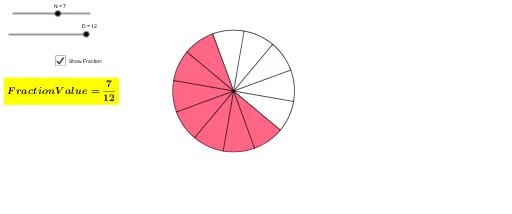
This example simply demonstrates the concept of fractions. Key mathematical concepts include the basic properties of fractions. Construction highlights the use of Circle, Rotate, Segment, and Angle commands in GeoGebra. Suitable for high-grade elementary or junior high school students to learn the basic concepts and operations of fractions.
GeoGebra Commands & Parameters
Circle(A, B) → cRotate(B, (360°) / D, A) → B'Rotate(B', (360°) / D, A) → B''Rotate(B'', (360°) / D, A) → B'''Rotate(B''', (360°) / D, A) → CRotate(C, (360°) / D, A) → C'Rotate(C', (360°) / D, A) → C''Rotate(C'', (360°) / D, A) → C'''Rotate(C''', (360°) / D, A) → ERotate(E, (360°) / D, A) → E'Rotate(E', (360°) / D, A) → E''Rotate(E'', (360°) / D, A) → E'''Rotate(E''', (360°) / D, A) → FSegment(F, A) → fSegment(E''', A) → gSegment(E'', A) → hSegment(E', A) → iSegment(E, A) → jSegment(C''', A) → kSegment(C'', A) → lSegment(C', A) → mSegment(C, A) → nSegment(B''', A) → pSegment(B'', A) → qSegment(B', A) → rRotate(E''', (360° * N / D), A) → GAngle(E''', A, G) → αCircleSector(A, E''', G) → d
AI Drawing Prompt Reference
Draw a circle and extend equal line segments from the center to create equal sectors, each with the same angle between them, and label the angle of one sector to illustrate the basic concept and properties of fractions.
The prompt above was compiled from the original drawing commands and is for reference only.