
Fraction Calculations and Geometric Demonstrations
Loading the math board and drawing, please wait…
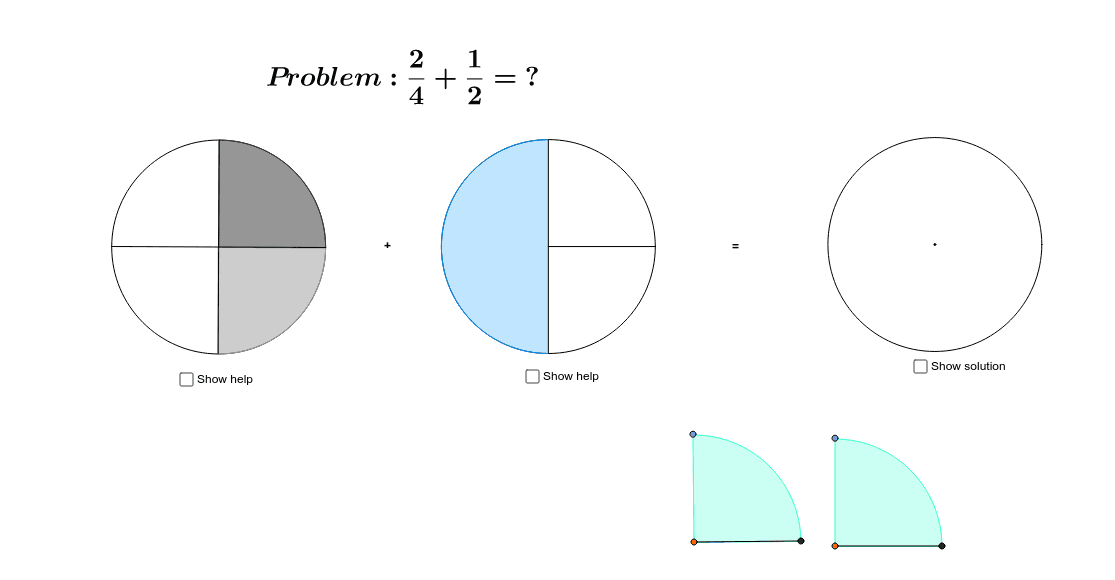
This example dynamically demonstrates the integration of fraction calculations with geometric figures, visually showcasing the processes of addition, subtraction, multiplication, and division of fractions. Core mathematical concepts include fraction operations, conditional probability, circles, tangent functions, arithmetic operations, and continuity. Construction highlights the use of GeoGebra commands and objects such as Circle, Point, Line, OrthogonalLine, Intersect, Segment, CircleSector, and Semicircle. Suitable for high school mathematics education, helping students understand the connection between fraction operations and geometric shapes, and enhancing spatial reasoning skills.
GeoGebra Commands & Parameters
Circle(A, 4) → cPoint(c) → BLine(A, B) → aOrthogonalLine(A, a) → bIntersect(c, b) → C, DIntersect(c, a) → E, FSegment(A, E) → dSegment(A, C) → eSegment(A, F) → fSegment(A, D) → gPoint(Circle[G, 4]) → HSegment(G, H) → hOrthogonalLine(G, h) → iPoint(i) → ICircleSector(G, H, I) → kCircle(J, 4) → pPoint(Circle[J, 4]) → KSegment(J, K) → jOrthogonalLine(J, j) → lIntersect(p, l) → L, MSegment(J, M) → mSegment(J, L) → nSemicircle(L, M) → qPoint(Circle[N, 4]) → OSegment(N, O) → rOrthogonalLine(N, r) → sPoint(s) → PCircleSector(N, O, P) → tCircleSector(A, C, E) → c_1CircleSector(A, F, C) → d_1Circle(Q, 4) → e_1Point(Circle[Q, 4]) → RSegment(Q, R) → a_1OrthogonalLine(Q, a_1) → b_1Intersect(e_1, b_1) → S, TCircleSector(Q, R, T) → f_1CircleSector(Q, S, R) → g_1Semicircle(S, T) → k_1
AI Drawing Prompt Reference
Draw a circle and mark two points on it. Connect these points with a line segment. Then, draw a perpendicular line from the center of the circle to this line segment and find the intersection points. Connect the center to these intersection points with line segments. Draw another circle centered at the center. On one of the intersection points, draw a sector. From the center, draw a line to one endpoint of the sector, then draw a perpendicular line from this endpoint to find another intersection point with the circle. Finally, draw a semicircle on the other intersection point and a sector at the center.
The prompt above was compiled from the original drawing commands and is for reference only.