
Fraction Calculations and Birthday Cake Problem
Loading the math board and drawing, please wait…
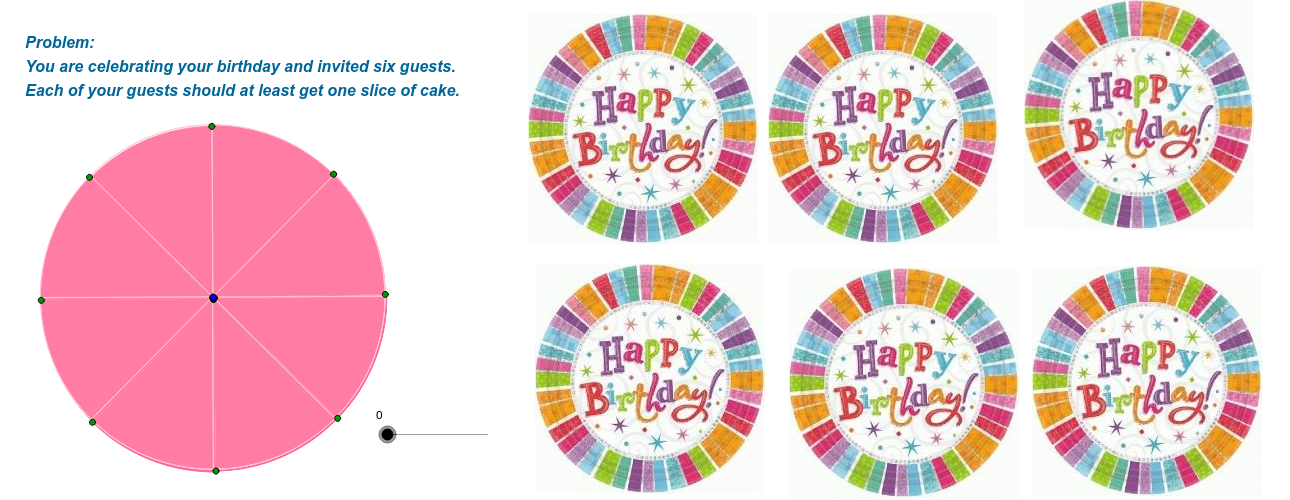
This example demonstrates the application of fraction calculations in geometric problems through the birthday cake division scenario. It involves core mathematical concepts such as arithmetic operations with fractions, geometric constructions, properties of equilateral triangles, and real numbers. The construction utilizes GeoGebra commands and objects like Circle, Point, Line, OrthogonalLine, Intersect, Segment, Midpoint, and CircleSector. It is suitable for middle school and above students to visualize and understand the practical use of fractions in geometric contexts.
GeoGebra Commands & Parameters
Circle(A, 4) → cPoint(c) → BLine(A, B) → a_7OrthogonalLine(A, a_7) → bIntersect(c, a_7) → C, DIntersect(c, b) → E, FSegment(B, F) → dMidpoint(d) → GOrthogonalLine(G, d) → eIntersect(c, e) → H, ICircleSector(A, B, H) → fCircle(J, 4) → gPoint(g) → KSegment(J, K) → hOrthogonalLine(J, h) → iIntersect(g, i) → L, MSegment(K, M) → jMidpoint(j) → NOrthogonalLine(N, j) → kIntersect(g, k) → O, PCircleSector(J, K, O) → pCircle(A_1, 4) → c_1Point(c_1) → B_1Line(A_1, B_1) → a_1OrthogonalLine(A_1, a_1) → b_1Intersect(c_1, a_1) → C_1, D_1Intersect(c_1, b_1) → E_1, F_1Segment(B_1, F_1) → d_1Midpoint(d_1) → G_1OrthogonalLine(G_1, d_1) → e_1Intersect(c_1, e_1) → H_1, I_1CircleSector(A_1, B_1, H_1) → f_1Circle(A_2, 4) → c_2Point(c_2) → B_2Line(A_2, B_2) → a_2OrthogonalLine(A_2, a_2) → b_2Intersect(c_2, a_2) → C_2, D_2Intersect(c_2, b_2) → E_2, F_2Segment(B_2, F_2) → d_2Midpoint(d_2) → G_2OrthogonalLine(G_2, d_2) → e_2Intersect(c_2, e_2) → H_2, I_2CircleSector(A_2, B_2, H_2) → f_2Circle(A_3, 4) → c_3Point(c_3) → B_3Line(A_3, B_3) → a_3OrthogonalLine(A_3, a_3) → b_3Intersect(c_3, a_3) → C_3, D_3Intersect(c_3, b_3) → E_3, F_3Segment(B_3, F_3) → d_3Midpoint(d_3) → G_3OrthogonalLine(G_3, d_3) → e_3Intersect(c_3, e_3) → H_3, I_3CircleSector(A_3, B_3, H_3) → f_3Circle(A_4, 4) → c_4Point(c_4) → B_4Line(A_4, B_4) → a_4OrthogonalLine(A_4, a_4) → b_4Intersect(c_4, a_4) → C_4, D_4Intersect(c_4, b_4) → E_4, F_4Segment(B_4, F_4) → d_4Midpoint(d_4) → G_4OrthogonalLine(G_4, d_4) → e_4Intersect(c_4, e_4) → H_4, I_4CircleSector(A_4, B_4, H_4) → f_4Circle(A_5, 4) → c_5Point(c_5) → B_5Line(A_5, B_5) → a_5OrthogonalLine(A_5, a_5) → b_5Intersect(c_5, a_5) → C_5, D_5Intersect(c_5, b_5) → E_5, F_5Segment(B_5, F_5) → d_5Midpoint(d_5) → G_5OrthogonalLine(G_5, d_5) → e_5Intersect(c_5, e_5) → H_5, I_5CircleSector(A_5, B_5, H_5) → f_5Circle(A_6, 4) → c_6Point(c_6) → B_6Line(A_6, B_6) → a_6OrthogonalLine(A_6, a_6) → b_6Intersect(c_6, a_6) → C_6, D_6Intersect(c_6, b_6) → E_6, F_6Segment(B_6, F_6) → d_6Midpoint(d_6) → G_6OrthogonalLine(G_6, d_6) → e_6Intersect(c_6, e_6) → H_6, I_6CircleSector(A_6, B_6, H_6) → f_6Circle(Q, 4) → qPoint(q) → RLine(Q, R) → lOrthogonalLine(Q, l) → mIntersect(q, m) → S, TIntersect(q, l) → U, VSegment(T, R) → nSegment(S, R) → rMidpoint(n) → WMidpoint(r) → ZOrthogonalLine(W, n) → sOrthogonalLine(Z, r) → tIntersect(q, t) → J_1, K_1Intersect(q, s) → L_1, M_1CircleSector(Q, M_1, T) → g_1CircleSector(Q, T, K_1) → h_1CircleSector(Q, K_1, V) → k_1CircleSector(Q, V, L_1) → p_1CircleSector(Q, L_1, S) → q_1CircleSector(Q, S, J_1) → r_1CircleSector(Q, J_1, R) → s_1CircleSector(Q, R, M_1) → t_1
AI Drawing Prompt Reference
Draw a circle and find its center. Draw a diameter and two perpendicular lines to it, intersecting the circle at four points. Connect the center to one of the intersection points and draw a perpendicular bisector of this line segment, intersecting the circle at two more points. Draw two sectors with the center and one intersection point as centers. Repeat this process three times to create three identical shapes, each consisting of a circle, two perpendicular lines, a diameter, a perpendicular bisector, two sectors, and a line segment.
The prompt above was compiled from the original drawing commands and is for reference only.