
Fraction Bar - Subtraction
Loading the math board and drawing, please wait…
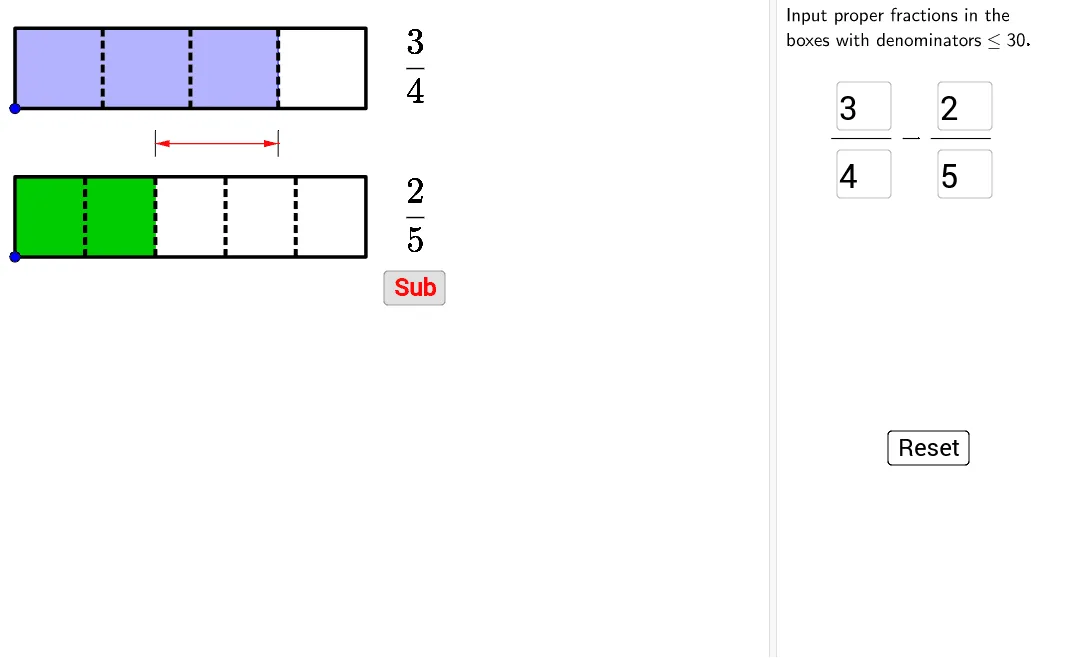
This example demonstrates how to use fraction bars for subtraction. Key mathematical concepts include fractions and subtraction. Using GeoGebra commands such as Point, Ray, Polygon, Sequence, etc., a model including all the same information can be constructed. Suitable for high-grade elementary or junior high school students learning fraction operations.
GeoGebra Commands & Parameters
Point(yAxis) → CPoint(Segment[C + (0, h), C + (0, (1.85 * h))]) → BPoint(Segment[B + (0, h), B + (0, (1.85 * h))]) → AIf(t ≤ 0.5, 0, (2 * (t - 0.5))) → t2If(t ≤ 0.5, (2 * t), 1) → t1Ray((0, 1.9), (0, 2.9)) → fPolygon({A, A + (l, 0), A + (l, h), A + (0, h)}) → poly1Polygon({B, B + (l, 0), B + (l, h), B + (0, h)}) → poly2Sequence(Segment[A + ((i * l / a1), 0), A + ((i * l / a1), h)], i, 1, a1 - 1) → list1Sequence(Segment[B + ((i * l / a2), 0), B + ((i * l / a2), h)], i, 1, a2 - 1) → list2Polygon({A, A + ((b1 * l / a1), 0), A + ((b1 * l / a1), h), A + (0, h)}) → poly3Polygon({B, B + ((b2 * l / a2), 0), B + ((b2 * l / a2), h), B + (0, h)}) → poly4Sequence(Sequence[Segment[A + ((i * l / a1) + (j * l / ((a1 * c1))), 0), A + ((i * l / a1) + (j * l / ((a1 * c1))), h)], j, 1, c1 - 1], i, 0, a1 - 1) → list3Sequence(Sequence[Segment[B + ((i * l / a2) + (j * l / ((a2 * c2))), 0), B + ((i * l / a2) + (j * l / ((a2 * c2))), h)], j, 1, c2 - 1], i, 0, a2 - 1) → list4If(a1 ≟ a2, true, false) → equaldIf(equald ∧ ((Div[b1 + b2, a1] > 0) ∨ (GCD[b1 + b2, a1] > 1)), true, If[(Div[(b1 * c1) + (b2 * c2), (a1 * c1)] > 0) ∨ (GCD[(b1 * c1) + (b2 * c2), (a1 * c1)] > 1), true, false]) → simplifyTextfield(a1) → InputBox1Textfield(b1) → InputBox2Textfield(a2) → InputBox3Textfield(b2) → InputBox4Polygon({A', A' + (l, 0), A' + (l, h), A' + (0, h)}) → poly5Polygon({B', B' + ((b2 / a2 * l), 0), B' + ((b2 / a2 * l), h), B' + (0, h)}) → poly6Polygon({A', A' + ((b1 * l / a1), 0), A' + ((b1 * l / a1), h), A' + (0, h)}) → poly7Polygon({B', B' + ((b2 * l / a2), 0), B' + ((b2 * l / a2), h), B' + (0, h)}) → poly8Sequence(Sequence[Segment[A' + ((i * l / a1) + (j * l / ((a1 * c1))), 0), A' + ((i * l / a1) + (j * l / ((a1 * c1))), h)], j, 1, c1 - 1], i, 0, b1 - 1) → list8Sequence(Sequence[Segment[B' + ((i * l / a2) + (j * l / ((a2 * c2))), 0), B' + ((i * l / a2) + (j * l / ((a2 * c2))), h)], j, 1, c2 - 1], i, 0, b2 - 1) → list9Segment(C - (0, 0.5), C - (0, 1)) → gSegment(D + (0, -0.5), D + (0, 0.5)) → jSegment(C + ((b1 / a1 * l), -0.5), C + ((b1 / a1 * l), -1)) → iVector(Midpoint[g], Midpoint[i]) → uVector(Midpoint[i], Midpoint[g]) → vSequence(Segment[A' + ((i * l / a1), 0), A' + ((i * l / a1), h)], i, 0, b1) → list6Sequence(Segment[B' + ((i * l / a2), 0), B' + ((i * l / a2), h)], i, 0, b2) → list7Sequence(Polygon[{C + ((i * l), 0), C + ((i * l) + l, 0), C + ((i * l) + l, h), C + ((i * l), h)}], i, 1, floor(b1 / a1 + b2 / a2)) → list5Segment(B', B' + ((b2 / a2 * l), 0)) → kSegment(B' + ((b2 / a2 * l), h), B' + (0, h)) → mIf(b1 / a1 + b2 / a2 ≥ 1, true, false) → improperFractionText(b1 / a1 - b2 / a2) → text19FractionText(b1 / a1 - b2 / a2 + 1) → text20Sequence(Sequence[Segment[C + ((i * l / ((a1 * c1))) + (j * l), 0), C + ((i * l / ((a1 * c1))) + (j * l), h)], i, 1, (a1 * c1) - 1], j, 0, If[b1 / a1 + b2 / a2 ≤ 1, 0, 1]) → list10If(result ≟ 0, "0", abs(result - floor(result)) < 10^(-6), result, result > 0, If[floor(result) ≟ 0, "", "" + (floor(result))] + "" + (FractionText[result - floor(result)]), "-" + (If[floor(abs(result)) ≟ 0, "", "" + (floor(abs(result)))]) + "" + (FractionText[abs(result) - floor(abs(result))])) → resultTextSegment(P + (0, -0.25), P + (0, 0.25)) → pSegment(Q + (0, -0.25), Q + (0, 0.25)) → qSegment(C + ((b1 / a1 * l), -0.5), C + ((b1 / a1 * l), -1)) → nVector(Midpoint[p], Midpoint[q]) → bVector(Midpoint[q], Midpoint[p]) → cSegment(D + (0, 0.25), D + (0, -0.25)) → rSegment(E + (0, 0.25), E + (0, -0.25)) → sVector(Midpoint[r], Midpoint[s]) → wVector(Midpoint[s], Midpoint[r]) → aSegment(F + (0, -0.25), F + (0, 0.25)) → dVector(E, F) → eVector(F, E) → u_1
AI Drawing Prompt Reference
Draw a fraction subtraction bar model. Place two rectangular bars side by side at the top, representing the minuend and subtrahend, each divided into equal parts with some parts shaded to indicate the numerator. Below, draw two corresponding bars to show the subtraction result, with one partially shaded and the other fully shaded. Add arrows and line segments below the bars to illustrate the subtraction process. Include fraction text and result text, along with input boxes for adjusting numerators and denominators. The layout should be clear and suitable for educational demonstration.
The prompt above was compiled from the original drawing commands and is for reference only.