
Fraction Addition GeoGebra Visualization
Loading the math board and drawing, please wait…
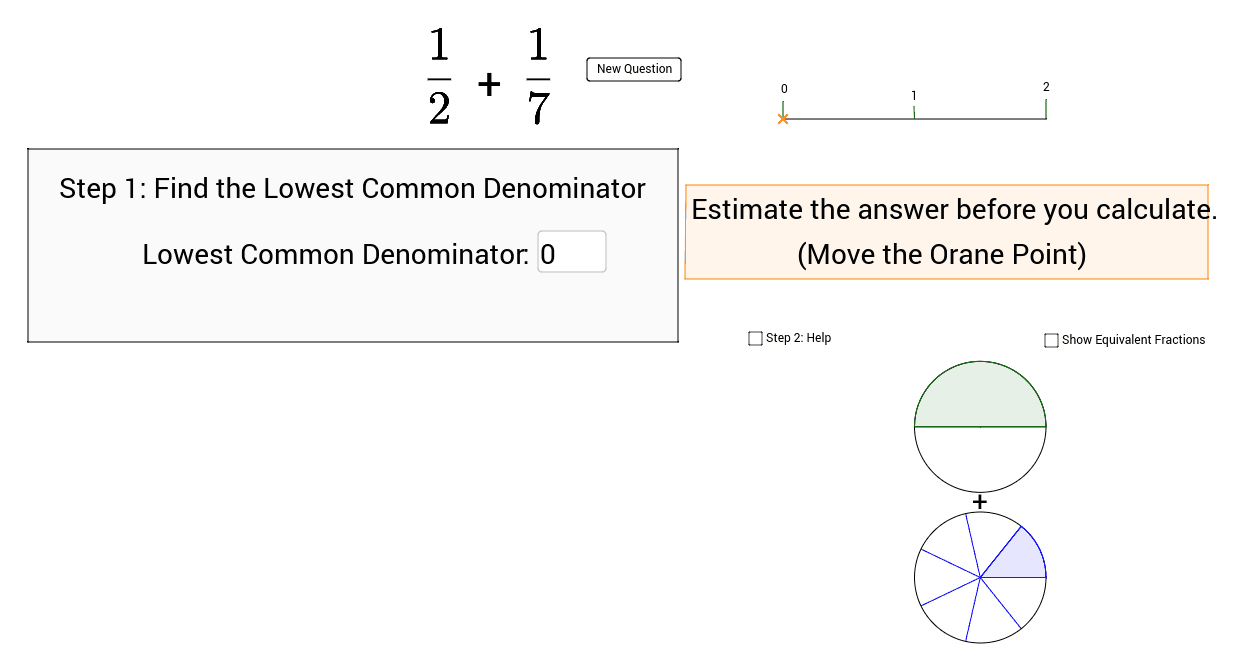
This GeoGebra example visually demonstrates fraction addition through a geometric model, focusing on estimation and calculation. Core mathematical concepts include fraction addition, least common multiple (LCM), and numerator/denominator manipulation. The construction extensively uses GeoGebra commands such as Segment, Point, Random, LCM, Textfield, Polygon, Midpoint, Intersect, Vector, Circle, Sequence, and Sector, combining points, lines, circles, polygons, and sequences for interactive exploration. It is suitable for middle and high school mathematics, helping students understand fraction addition from a geometric perspective and reinforce computational rules.
GeoGebra Commands & Parameters
Segment(O, P) → iPoint(i) → U_1Random(2, 10) → Denominator1Random(2, 10) → Denominator2Random(1, Denominator1 - 1) → Numerator1Random(1, Denominator2 - 1) → Numerator2LCM(Denominator1, Denominator2) → CommonDTextfield(ans1) → inputBox1Segment(A, B) → dTextfield(ans2) → inputBox2Polygon(C, D, E, F) → poly1, c_1, d_1, e, fTextfield(ans3) → inputBox3Segment(G, H) → gTextfield(ans4) → inputBox4Segment(I, J) → hPolygon(K, L, M, N) → poly2, k, l, m, nMidpoint(i) → QPoint(i) → RSegment(R, S) → jSegment(Q, T) → pPoint(i) → USegment(U, V) → q_1Intersect(i, j) → A_1Vector(A_1, Z) → uVector(Z, B_1) → vMidpoint(Z, B_1) → C_1Polygon(E_1, F_1, G_1, H_1) → poly3, e_1, f_1, g_1, h_1Vector(M_1, N_1) → wVector(O_1, P_1) → zVector(Q_1, R_1) → tVector(S_1, T_1) → u_1Circle((15, 3.3), 1) → Circle1Circle((15, 1), 1) → Circle2Sequence(360° * i / o, i, 0, o) → list1Sequence(Rotate[V_1, Element[list1, i], (15, 3.3)], i, 0, o) → list2Sequence(Segment[Element[list2, i], (15, 3.3)], i, 0, o + 1) → list3Sector(Circle1, V_1, Element[list2, Numerator1 + 2]) → rCircle((17.5, 3.3), 1) → Circle3Sequence(Rotate[W_1, 360° * i / CommonD, (17.5, 3.3)], i, 1, CommonD) → list4Sequence(Segment[Z_1, Element[list4, i]], i, 1, CommonD) → list5Sector(Circle3, W_1, Element[list4, c]) → k_1Sequence(360° * i / q, i, 0, q) → list7Sequence(Rotate[D_1, Element[list7, i], A_2], i, 0, q) → list6Sequence(Segment[Element[list6, i], (15, 1)], i, 0, q + 1) → list8Sector(Circle2, A_2, Element[list6, Numerator2 + 2]) → p_1Circle((17.5, 1), 1) → Circle4Sequence(Rotate[C_2, 360° * i / CommonD, (17.5, 1)], i, 1, CommonD) → list9Sequence(Segment[B_2, Element[list9, i]], i, 1, CommonD) → list10Sector(Circle4, B_2, Element[list9, c_3]) → r_1
AI Drawing Prompt Reference
Create a visual for fraction addition. Draw a horizontal segment with several points on it. Generate two random denominators and two numerators. Construct two rectangles, each divided into equal parts according to its denominator, with the numerator parts shaded. Then draw two circles, each divided into sectors equal to its denominator, shading the numerator sectors. Place four input boxes below for answers. Use segments and arrows to connect parts, illustrating the addition process.
The prompt above was compiled from the original drawing commands and is for reference only.