
Force Diagram: Sphere on Top of Spheres
Loading the math board and drawing, please wait…
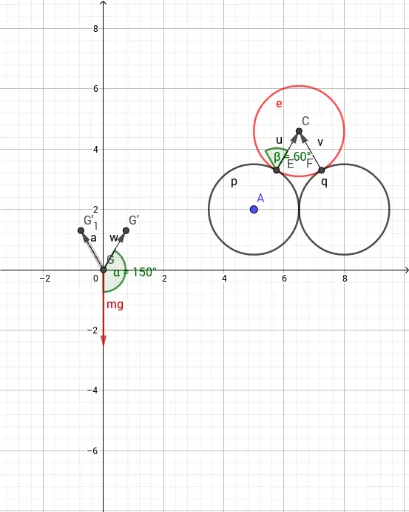
This GeoGebra example demonstrates how to construct a force diagram for a sphere resting on top of another sphere, visually representing gravitational, normal, and contact forces as vectors. The core mathematical concepts involve static equilibrium, vector decomposition and composition, along with geometric properties of circles, tangents, angles, and perpendicular bisectors. The construction uses Circle commands to draw the cross-sections of the spheres, Intersect and LineBisector to locate tangent points and symmetry axes, Point, Line, and Vector to create force lines and arrows, and Translate and Angle to adjust force directions and label angles. This resource is suitable for high school physics or introductory university mechanics, helping students understand coplanar force balance and vector diagrams, while also serving as a practical example of geometric construction and physical modeling in GeoGebra.
GeoGebra Commands & Parameters
Circle(A, B) → cCircle(B, A) → dIntersect(c, d, 1) → CLineBisector(A, B) → fPoint(f) → DLine(A, B) → gLine(B, C) → hLine(C, A) → iLineBisector(C, A) → jLineBisector(C, B) → kIntersect(i, j) → EIntersect(h, k) → FCircle(C, E) → eCircle(A, E) → pCircle(B, F) → qCircle(D, A) → rVector(E, C) → uVector(F, C) → vIntersect(xAxis, yAxis) → GTranslate(G, u) → G'Vector(G, G') → wTranslate(G, v) → G'_1Vector(G, G'_1) → aAngle(mg, w) → αAngle(u, v) → β