
Fit Four Pieces into a Square
Loading the math board and drawing, please wait…
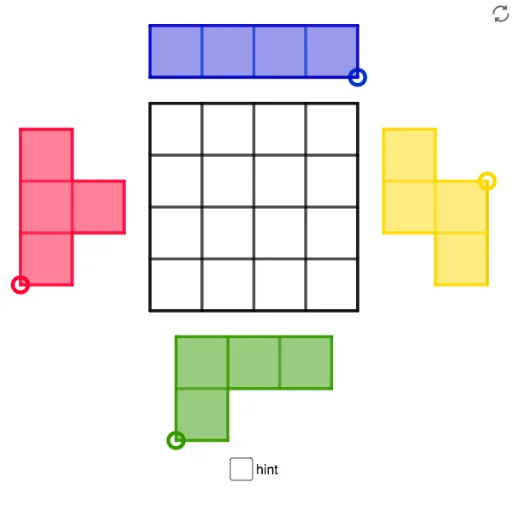
This example demonstrates how to fit four irregular pieces into a square, involving coordinate geometry, inequalities, polygon construction, and logical reasoning. Key GeoGebra commands used include Intersect, Polygon, Midpoint, Segment, Point, and Circle for constructing and analyzing the shapes. Suitable for middle school students and above to develop geometric construction and spatial reasoning skills.
GeoGebra Commands & Parameters
Intersect(xAxis, yAxis) → APolygon(A, B, 4) → poly1, f, g, h, i, C, DMidpoint(D, A) → EMidpoint(A, B) → FMidpoint(B, C) → GMidpoint(C, D) → HMidpoint(H, D) → IMidpoint(D, E) → JMidpoint(E, A) → KMidpoint(A, F) → LMidpoint(F, B) → MMidpoint(B, G) → NMidpoint(G, C) → OMidpoint(C, H) → PSegment(I, L) → jSegment(H, F) → kSegment(P, M) → lSegment(J, O) → mSegment(E, G) → nSegment(K, N) → pPolygon(A, L, 4) → poly2, q, r, s, t, Q, RPolygon(F, M, 4) → poly3, a, b, c, d, S, TPolygon(Q, T, 4) → poly4, e, f_1, g_1, h_1, U, VPolygon(E, V, 4) → poly5, i_1, j_1, k_1, l_1, W, ZPolygon(I, W, 4) → poly6, m_1, n_1, p_1, q_1, A_1, B_1Polygon(A_1, U, 4) → poly7, r_1, s_1, t_1, a_1, C_1, D_1Polygon(C_1, S, 4) → poly8, b_1, c_1, d_1, e_1, E_1, F_1Polygon(P, D_1, 4) → poly9, f_2, g_2, h_2, i_2, G_1, H_1Point(Circle[I_1, 2]) → J_1Segment(I_1, J_1) → j_2Midpoint(j_2) → K_1Polygon(I_1, K_1, 4) → whiteS2, k_2, l_2, m_2, n_2, L_1, M_1Polygon(K_1, J_1, 4) → poly11, p_2, q_2, r_2, s_2, N_1, O_1Polygon(L_1, N_1, 4) → whiteS1, t_2, a_2, b_2, c_2, P_1, Q_1Polygon(P_1, N_1, 4) → poly13, d_2, e_2, f_3, g_3, R_1, S_1Polygon(I_1, J_1, N_1, R_1, S_1, Q_1, L_1, M_1) → Sborder_0, i_3, j_3, n_3, r_3, s_3, q_3, l_3, m_3Polygon(M_1, I_1, J_1, N_1, R_1, S_1, Q_1, L_1) → Sborder_2, m_4, i_4, j_4, n_4, r_4, s_4, q_4, l_4Segment(L_1, K_1) → h_3Segment(P_1, N_1) → k_3Segment(L_1, N_1) → p_3Point(Circle[T_1, 2]) → U_1Segment(T_1, U_1) → t_3Midpoint(t_3) → V_1Polygon(T_1, V_1, 4) → poly10, a_3, b_3, c_3, d_3, W_1, Z_1Polygon(V_1, U_1, 4) → whiteL1, e_3, f_4, g_4, h_4, A_2, B_2Polygon(Z_1, W_1, 4) → whiteL2, k_4, p_4, t_4, a_4, C_2, D_2Polygon(D_2, C_2, 4) → poly15, b_4, c_4, d_4, e_4, E_2, F_2Polygon(F_2, T_1, U_1, A_2, W_1, E_2) → Lborder_0, f_5, t_5, u_1, a_5, w_1, e_5Segment(D_2, C_2) → g_5Segment(Z_1, W_1) → h_5Segment(W_1, V_1) → i_5Polygon(F_2, T_1, U_1, A_2, W_1, E_2) → Lborder_2, f_6, t_6, u_2, a_6, w_2, e_6Point(Circle[G_2, 3]) → H_2Segment(G_2, H_2) → j_5Circle(G_2, 1) → c_5Circle(H_2, 1) → d_5Intersect(c_5, j_5, 1) → I_2Intersect(d_5, j_5, 1) → J_2Polygon(G_2, I_2, 4) → poly14, k_5, l_5, m_5, n_5, K_2, L_2Polygon(I_2, J_2, 4) → whiteT1, p_5, q_5, r_5, s_5, M_2, N_2Polygon(J_2, H_2, 4) → poly17, b_5, g_6, h_6, i_6, O_2, P_2Polygon(K_2, M_2, 4) → poly18, j_6, k_6, l_6, m_6, Q_2, R_2Polygon(G_2, H_2, O_2, M_2, Q_2, R_2, K_2, L_2) → Tborder_0, g_7, h_7, o_2, m_7, q_6, r_6, k_7, l_7Segment(K_2, I_2) → n_6Segment(K_2, M_2) → p_6Segment(M_2, J_2) → s_6Polygon(G_2, H_2, O_2, M_2, Q_2, R_2, K_2, L_2) → Tborder_2, g_8, h_8, o_1, m_8, q_7, r_7, k_8, l_8Point(Circle[S_2, 4]) → T_2Segment(S_2, T_2) → b_6Midpoint(b_6) → U_2Midpoint(S_2, U_2) → V_2Midpoint(U_2, T_2) → W_2Polygon(S_2, V_2, 4) → whiteI1, c_6, d_6, f_7, i_7, Z_2, A_3Polygon(V_2, U_2, 4) → poly19, j_7, n_7, p_7, s_7, B_3, C_3Polygon(U_2, W_2, 4) → whiteI2, t_7, a_7, b_7, c_7, D_3, E_3Polygon(W_2, T_2, 4) → Iborder_1, d_7, e_7, f_8, i_8, F_3, G_3Polygon(A_3, S_2, T_2, F_3) → Iborder_0, a_8, s_8, t_8, f_9Segment(Z_2, V_2) → j_8Segment(B_3, U_2) → n_8Segment(D_3, W_2) → p_8Polygon(A_3, S_2, T_2, F_3) → Iborder_2, a_9, s_9, t_9, f_{10}