
Finding the Transformation: Polygon Mirror Construction
Loading the math board and drawing, please wait…
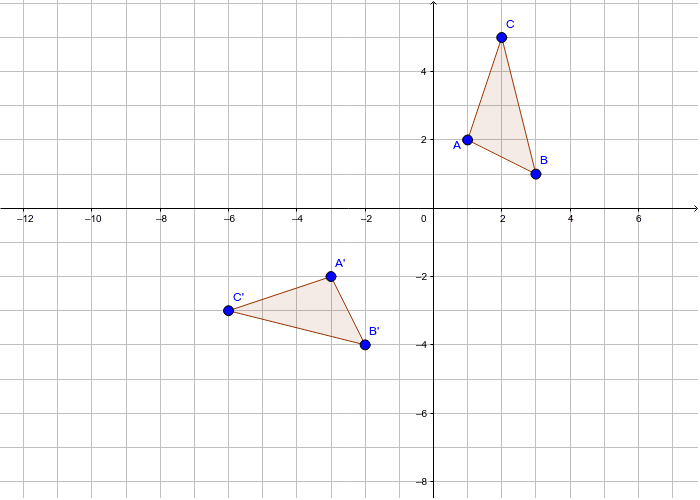
This GeoGebra example demonstrates how to identify and construct a geometric transformation by reflecting a triangle and its associated segments across a mirror line. The core mathematical concepts include reflection (axial symmetry), congruent figures, polygon vertex-edge correspondence, and rigid transformations in the coordinate plane. Construction highlights: the Polygon command is used to create the original triangle poly1 and its sides a, b, c from points A, B, C; the Mirror command then reflects points A, B, C and polygon poly1 across the specified axis to produce image points A′, B′, C′ and image polygon poly1′, together with corresponding image sides a′, b′, c′. By comparing the pre-image and image, learners can verify that mirror reflection preserves side lengths, angles, and overall congruence. This resource is suitable for middle school geometry instruction on transformations, high school review of congruence and symmetry, and classroom demonstrations of dynamic geometric construction.
GeoGebra Commands & Parameters
Polygon(A, B, C) → poly1, c, a, bMirror(A, y = (-x) - 1) → A'Mirror(B, y = (-x) - 1) → B'Mirror(C, y = (-x) - 1) → C'Polygon(A', B', C') → poly1', c', a', b'
AI Drawing Prompt Reference
Draw a triangle with its three sides, then reflect the triangle and its sides across the line y = -x - 1 to obtain the mirrored triangle and corresponding sides, showing that the reflection preserves side lengths, angles, and overall congruence; also indicate the corresponding vertices and edges of the original and reflected triangles for visual comparison in a clear coordinate plane for easy observation.
The prompt above was compiled from the original drawing commands and is for reference only.