
Finding the Center of Dilation
Loading the math board and drawing, please wait…
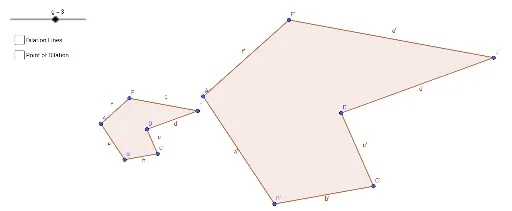
This example demonstrates how to locate the center of a dilation transformation by manipulating geometric figures. Key math concepts include similarity, central symmetry, and coordinate geometry. GeoGebra commands and objects used are Polygon, Dilate, and Line. Suitable for high school mathematics education to understand the properties and applications of dilation transformations.
GeoGebra Commands & Parameters
Polygon(A, B, C, D, E, F) → poly1, a, b, c, d, e, fDilate(A, g, G) → A'Dilate(B, g, G) → B'Dilate(C, g, G) → C'Dilate(D, g, G) → D'Dilate(E, g, G) → E'Dilate(F, g, G) → F'Polygon(A', B', C', D', E', F') → poly1', a', b', c', d', e', f'Line(G, F) → hLine(E, E') → iLine(D', D) → jLine(C', C) → kLine(B', B) → lLine(A, A') → m
AI Drawing Prompt Reference
Draw a hexagon ABCDEF, then perform an enlargement transformation around a center point G to get a new hexagon A'B'C'D'E'F'. Next, draw the perpendicular bisectors of the corresponding sides of the new hexagon A'B'C'D'E'F' and the original hexagon ABCDEF. The intersection points of these perpendicular bisectors are the center point G of the enlargement transformation.
The prompt above was compiled from the original drawing commands and is for reference only.