
Finding θ such that sinθ = cos15°
Loading the math board and drawing, please wait…
In collections
UCSS Secondary Math II Unit 5 Lesson 8
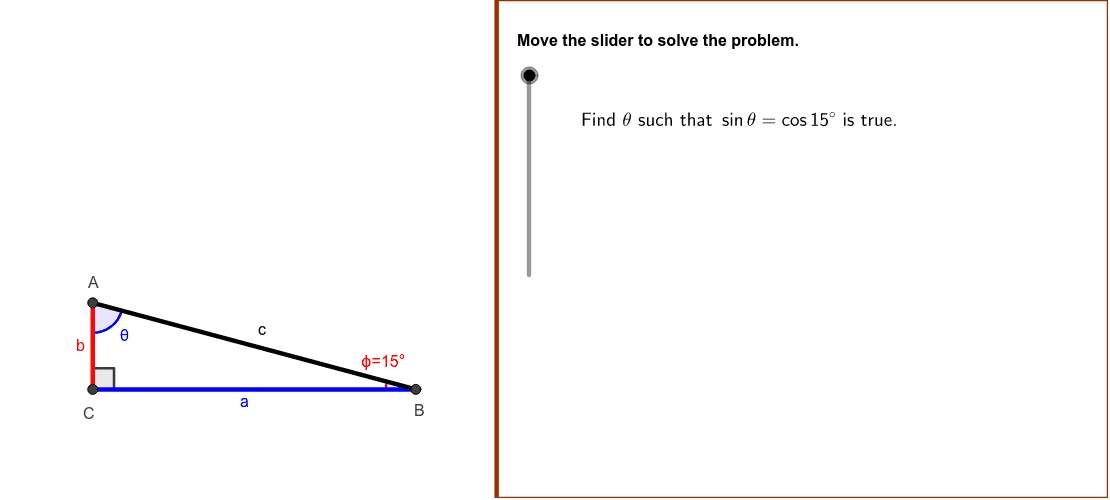
① This example demonstrates how to use GeoGebra to find the angle θ satisfying sinθ = cos15°, illustrating the complementary relationship between sine and cosine with a dynamic triangle. ② Core mathematical concepts include basic trigonometric identities, the complementary angle formula, angle measurement, and equation solving. ③ Construction highlights: the triangle ABC is built with Polygon, Segment, and Angle commands; sliders created via Min and SliderDirections control the angle; LengthBC, LengthAC, and EvaluateFunctions compute side lengths and function values; Directions text objects annotate the derivation steps. ④ Suitable for high‑school trigonometry instruction, classroom demonstration, and self‑guided exploration, and also serves as an introductory case for geometric construction and dynamic mathematics software.
GeoGebra Commands & Parameters
Min(4, (4 * cot(ABC))) → lengthBCPolygon((Edge, y(Corner[1])), Corner[2], Corner[3], (Edge, y(Corner[4]))) → Mask, a, b, c, dSegment(C, B) → BCSegment(A, C) → ACSegment(A, B) → ABAngle(A, B, C) → ABC1Angle(B, C, A) → BCAAngle(C, A, B) → CAB
AI Drawing Prompt Reference
Please draw a triangle ABC and use sliders to control the size of angle ABC. In this triangle, the lengths of sides BC and AC can be computed. Additionally, label the sizes of angles ABC, BCA, and CAB. The ultimate goal is to find an angle θ such that sinθ = cos15°, demonstrating the complementary relationship between sine and cosine.
The prompt above was compiled from the original drawing commands and is for reference only.