
Finding Function Roots
Loading the math board and drawing, please wait…
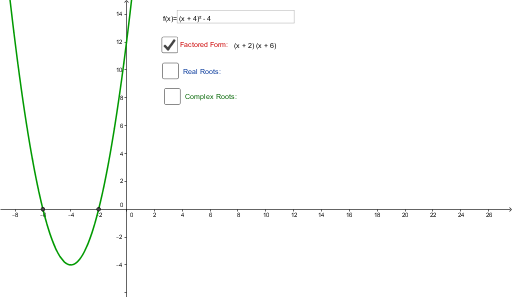
This example demonstrates how to find and visualize the roots of functions using GeoGebra, including real and complex roots. Key math concepts involve functions, roots, complex numbers, and analytical geometry. Construction highlights include commands like Textfield, Factor, Roots, TableText, ComplexRoot, and objects such as f, InputBox1, g, text1, a, A1, B1, A2, B2, text2, text4, text5, b, A3, B3, C3, z_1, z_2, text3, c. Suitable for high school mathematics education to understand the properties and calculation methods of function roots.
GeoGebra Commands & Parameters
Textfield(f) → InputBox1Factor(f) → gRoots(f) → A2, B2,TableText({{A2, B2}}, "|_") → text2ComplexRoot(f) → A3, B3, C3, z_1, z_2TableText({{A3}}, "|_") → text3
AI Drawing Prompt Reference
Graph a function and its factorization, showing real and complex roots, with text annotations for key points and root values. Start by plotting the function, then find its factorization and roots, label both real and complex roots, and finally display these values in text boxes.
The prompt above was compiled from the original drawing commands and is for reference only.