
Finding Common Ground with Venn Diagrams
Loading the math board and drawing, please wait…
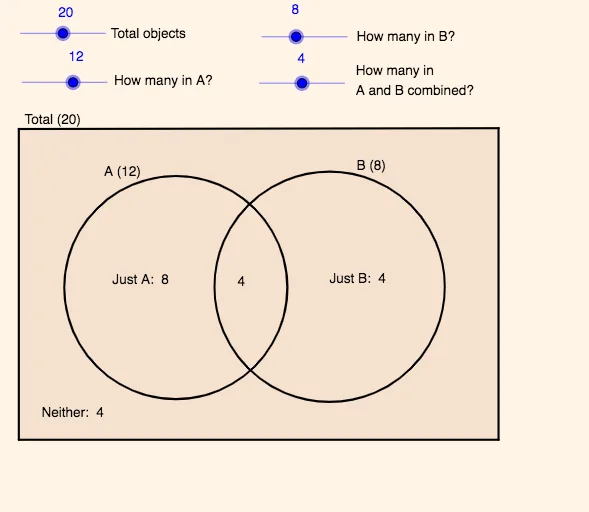
This GeoGebra example demonstrates how to use Venn diagrams to solve word problems by visually representing relationships between sets. It highlights core ideas from set theory: intersections and unions, logical structure of statements, and counting arguments that often appear in inclusion/overlap or mutually-exclusive scenarios. The construction focuses on creating circular regions and auxiliary polygonal boundaries, then labeling the regions clearly so the counts correspond directly to the textual conditions. From the construction summary, the key GeoGebra commands are Circle and Polygon, producing geometric objects such as the circles (e.g., A, B, C, D) and polygon support elements (e.g., poly1), while multiple text objects (text1–text11) are used to annotate each part of the diagram with the meaning of the quantities being asked. Suitable for middle to high school teaching, classroom visualization, and practice sessions targeting set/logic word problems.
GeoGebra Commands & Parameters
Circle(A, B) → c_1Circle(C, D) → dPolygon(E, F, G, H) → poly1, e, f, g, h
AI Drawing Prompt Reference
Draw the core structure of a Venn diagram on a plane: create two circles, each defined by its own pair of points, positioned so the circles overlap. Then add an auxiliary polygon boundary made from multiple vertices to frame the relevant regions. Leave clear space for labeling the different regions so the labels can represent the quantities implied by set relationships, especially the intersection and union areas. Ensure the overlap and non-overlap parts are visually distinct and correspond directly to the word-problem conditions.
The prompt above was compiled from the original drawing commands and is for reference only.