
Find Unknown Angles
Loading the math board and drawing, please wait…
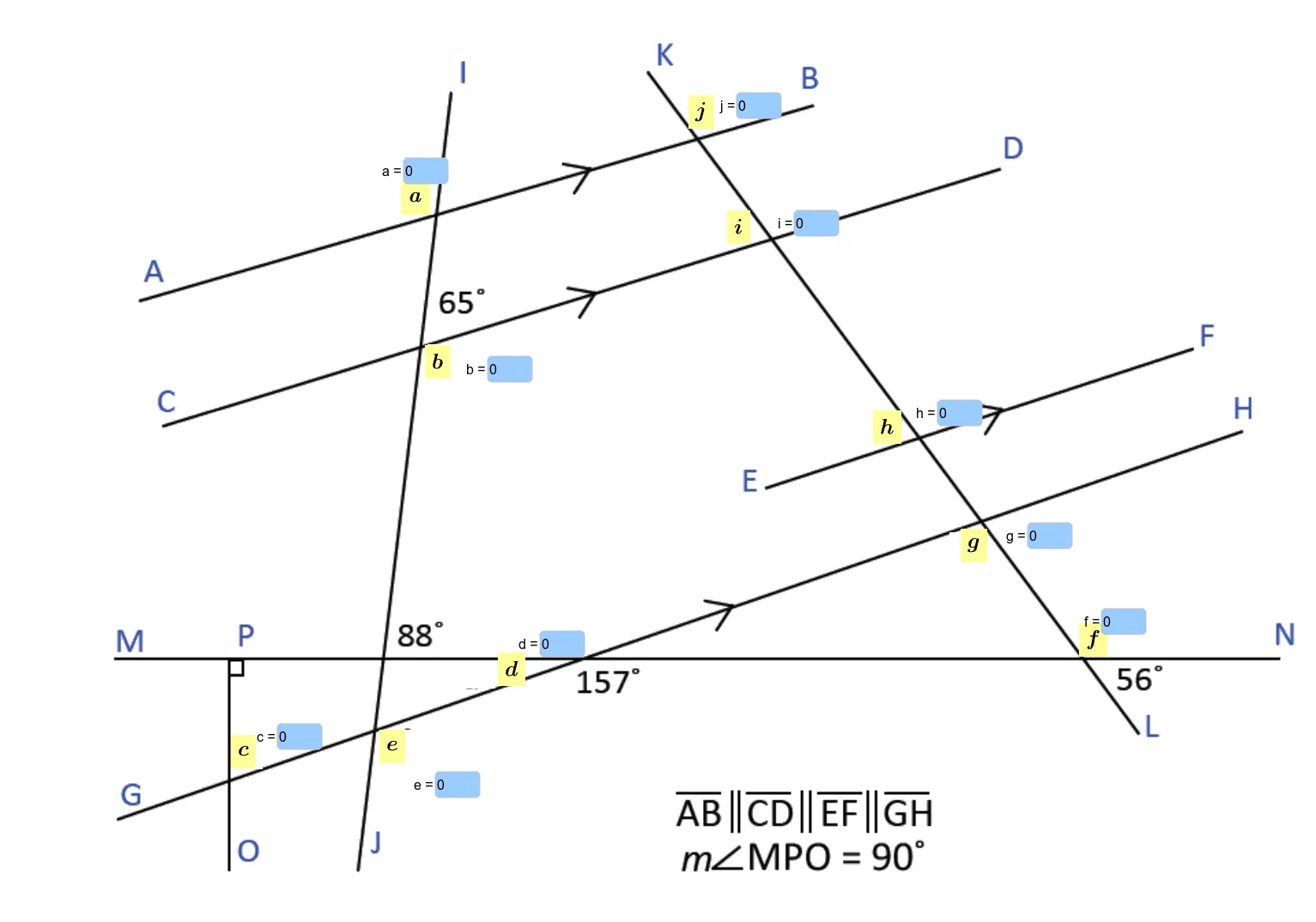
This example demonstrates how to find unknown angles in triangles and straight lines using GeoGebra. It involves core math concepts like angle properties, triangle sum theorem, and cosine rule. Construction highlights include using Textfield, objects pic1-text10, variables a-j, aRight-aAns, and InputBoxes. Suitable for middle school students and teachers for learning and demonstration purposes.
GeoGebra Commands & Parameters
Textfield(a) → InputBox1Textfield(b) → InputBox2Textfield(d) → InputBox3Textfield(c) → InputBox4Textfield(e) → InputBox5Textfield(f) → InputBox6Textfield(g) → InputBox7Textfield(h) → InputBox8Textfield(i) → InputBox9Textfield(j) → InputBox10
AI Drawing Prompt Reference
Draw a triangle with two known angles a and b, use the triangle angle sum theorem to find the third angle c. Then, draw a straight line with two known angles d and e, use the relationship of angles on a straight line to find the third angle f. Finally, use the cosine rule to calculate the side length of the triangle, input side lengths g, h, and i, and calculate angle j.
The prompt above was compiled from the original drawing commands and is for reference only.