
Find the Volume of a Rectangular Prism
Loading the math board and drawing, please wait…
In collections
Volume of Prisms
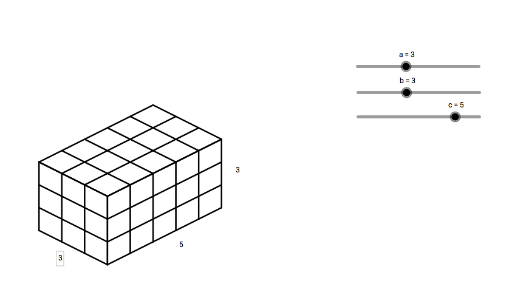
This example demonstrates how to dynamically visualize the calculation of the volume of a rectangular prism using GeoGebra. The core mathematical concepts involved include the volume formula V=abc, the construction of sequences, and the dynamic representation of geometric figures. Key GeoGebra commands and objects used in the construction, as outlined in the summary, are Sequence, and parameters a, b, c, list1 to list6, text1 to text3 for parametric control and text annotations. It is suitable for middle school students and above learning solid geometry volume calculations, as well as for understanding the intuitive concept of Riemann sums in calculus.
GeoGebra Commands & Parameters
Sequence(Segment[(n, a - n / 2), (n, ((-n)) / 2)], n, 0, b) → list1Sequence(Segment[(n + b, ((-b)) / 2 + n / 2), (n + b, ((-b)) / 2 + n / 2 + a)], n, 0, c) → list2Sequence(Segment[(0, a - n), (b, ((-b)) / 2 - n + a)], n, 0, a) → list3Sequence(Segment[(b, ((-b)) / 2 + n), (b + c, ((-b)) / 2 + n + c / 2)], n, 0, a) → list4Sequence(Segment[(n, ((-n)) / 2 + a), (n + c, c / 2 - n / 2 + a)], n, 0, b) → list5Sequence(Segment[(n, a + n / 2), (n + b, a + n / 2 - b / 2)], n, 0, c) → list6
AI Drawing Prompt Reference
Visualize the calculation of a rectangular prism's volume dynamically using three sliders for length, width, and height. Draw each face of the prism with sequences to illustrate the volume formula V=abc. Decompose each face into smaller rectangles and adjust the sliders dynamically to show the connection between volume calculation and integral concepts.
The prompt above was compiled from the original drawing commands and is for reference only.