
Ferris Wheel with Sine Function
Loading the math board and drawing, please wait…
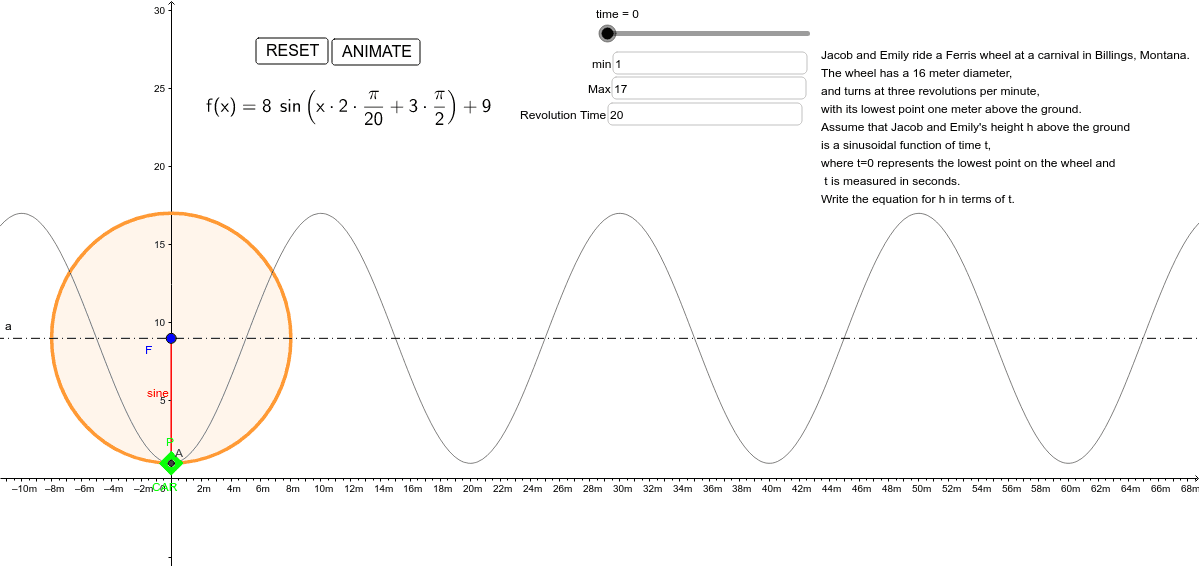
This example demonstrates the simulation of a Ferris wheel's motion using a sine function through GeoGebra. It involves core math concepts like sine functions, coordinate geometry, parametric equations, and geometric transformations. Key GeoGebra commands and objects used include Intersect, Circle, OrthogonalLine, Segment, and Textfield, as outlined in the construction summary. Suitable for high school mathematics education, illustrating the application of trigonometric functions in physical phenomena and parametric equation plotting.
GeoGebra Commands & Parameters
Intersect(f, a, (15.000000000000004, 9.000000000000004)) → BIntersect(f, yAxis, (0, 1)) → P_1Circle(F, r) → dIntersect(d, a, 2) → F_1OrthogonalLine(CAR, yAxis) → bIntersect(b, yAxis) → ASegment(CAR, A) → cSegment(A, F) → eSegment(CAR, F) → gTextfield(min) → InputBox1Textfield(Max) → InputBox2Textfield(revtime) → InputBox3