
Factorization - Exploring Divisor Pairs
Loading the math board and drawing, please wait…
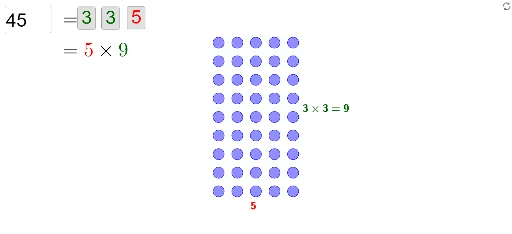
This example allows you to input an integer and explore different ways to generate it based on its prime factorization. Key mathematical concepts include factorization and divisors. GeoGebra commands such as Factors, Join, and Sequence are used in its construction. Suitable for middle school and above students to learn about factorization and number theory.
GeoGebra Commands & Parameters
Factors(n) → fmJoin(Sequence[Sequence[Element[Element[fm, i], 1], j, 1, Element[Element[fm, i], 2]], i, 1, Length[fm]]) → factorsSequence(If[Element[bools, i] ∧ Length[factors] ≥ i, Element[factors, i], 1], i, 1, Length[bools]) → list1Sequence(((floor(i / prows) * d), (Mod[i, prows] * d)) + (ts * Vector[((floor(i / prows) * d), (Mod[i, prows] * d)), (((floor(i / rows) * d), Mod[i, rows]) * d)]), i, 0, n - 1) → pointsElement(points, n) → MXTextfield(n) → inputBox1Sequence(If[(¬Element[bools, i]) ∧ Length[factors] ≥ i, Element[factors, i], 1], i, 1, Length[bools]) → list2Min(Sequence[If[Element[bools, i], i, 10000], i, 1, Length[bools]]) → minTrueMin(Sequence[If[¬Element[bools, i], i, 10000], i, 1, Length[bools]]) → minFalseSequence(If[i ≤ Length[factors] ∧ Element[bools, i], If[i > minTrue, "\times", ""] + (Element[list1, i]), ""], i, 1, Length[bools]) → rtSequence(If[i ≤ Length[factors] ∧ (¬Element[bools, i]), If[i > minFalse, "\times", ""] + (Element[list2, i]), ""], i, 1, Length[bools]) → ctCorner(5) → GVMax(Sequence[If[¬Element[bools, i], i, 0], i, 1, Min[Length[bools], Length[factors]]]) → maxFalseMax(Sequence[If[Element[bools, i], i, 0], i, 1, Min[Length[bools], Length[factors]]]) → maxTrueSequence(Circle[Element[points, i], (0.3 * d)], i, 1, n) → list3If(MXratio > ratio, innerW / ratio, innerH) → finHIf(MXratio > ratio, innerW, (innerH * ratio)) → finWText(If[rows ≟ 1, "1", Element[rt, 1] + (Element[rt, 2]) + (Element[rt, 3]) + (Element[rt, 4]) + (Element[rt, 5]) + (Element[rt, 6]) + (Element[rt, 7]) + (If[minTrue ≟ maxTrue, "", "=" + rows])], RT, false, true) → text1Text(If[cols ≟ 1, "1", Element[ct, 1] + (Element[ct, 2]) + (Element[ct, 3]) + (Element[ct, 4]) + (Element[ct, 5]) + (Element[ct, 6]) + (Element[ct, 7]) + (If[minFalse ≟ maxFalse, "", "=" + cols])], CT, false, true) → text2Sequence(If[Element[bools, i], "darkgreen", "red"], i, 1, Length[bools]) → colors
AI Drawing Prompt Reference
Create a visualization of the prime factorization of an integer. Start by entering an integer, then display its prime factors. Use these factors to generate different factor pairs and represent them with points. Finally, generate two product expressions based on these factor pairs, one showing the product of correct pairs and the other showing the product of incorrect pairs.
The prompt above was compiled from the original drawing commands and is for reference only.