
Eye Spiral
Loading the math board and drawing, please wait…
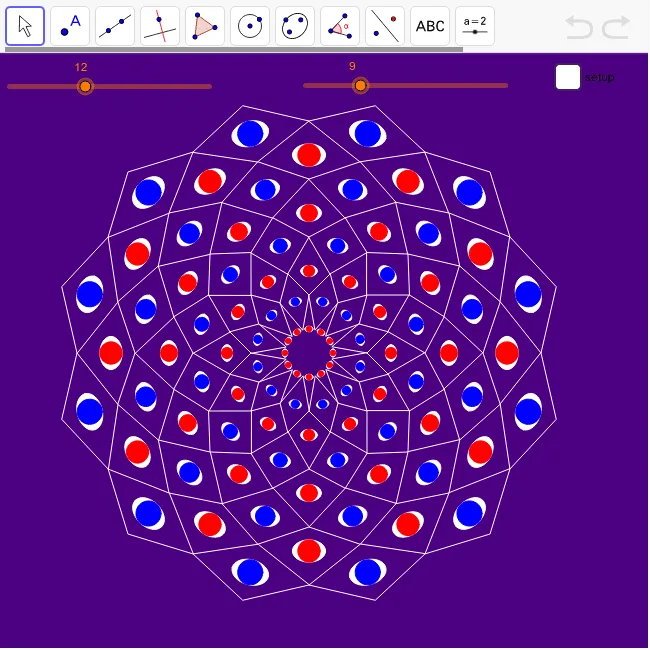
This example demonstrates a spiral pattern composed of multiple eye shapes, involving concepts like dilation, kite, rotation, function graphing, integral calculus, cylinder, binomial distribution, and angles. It uses commands like Point, productrose, Distance, Circle, Vector, Rotate, Radius, Ellipse, Translate, Sequence in GeoGebra for construction. Suitable for high school and above students learning geometric transformations and function graphing.
GeoGebra Commands & Parameters
Point(y = y(A)) → BPoint(Segment[A, B]) → Cproductrose(A, B, C, n, m) → list1, list2Distance(A, B) → dABCircle(C2, (((4 * π) * ratio) * dAB / n)) → cVector(A, B) → v1Rotate(v1, (0.5 * ang1)) → v2Radius(c) → rcEllipse(C + (0, (1.1 * rc)), C - (0, (1.1 * rc)), C + (rc, 0)) → dTranslate(Rotate[C2, (0.5 * ang1), A], Vector[(0.5 * v2)]) → C3Vector(C2, C3) → u1Translate(c, u1) → c2Translate(Rotate[d, (0.5 * ang1), A], Vector[(0.5 * v2)]) → d2Sequence(Translate[Dilate[d, (i + 1) / m, C2], Vector[(i * v1)]], i, 0, mm - 1) → list4Sequence(Translate[Dilate[c, (i + 1) / m, C2], Vector[(i * v1)]], i, 0, mm - 1) → list3Sequence(Translate[Dilate[d2, (i + 1.5) / m, C3], Vector[(i * v2)]], i, 0, mm - 1) → list5Sequence(Translate[Dilate[c2, (i + 1.5) / m, C3], Vector[(i * v2)]], i, 0, mm - 1) → list6Sequence(Rotate[list4, (i * ang1), A], i, 1, n) → list7Sequence(Rotate[list5, (i * ang1), A], i, 1, n) → list8Sequence(Rotate[list3, (i * ang1), A], i, 1, n) → list9Sequence(Rotate[list6, (i * ang1), A], i, 1, n) → list10
AI Drawing Prompt Reference
Draw a spiral pattern composed of multiple eye shapes, showcasing geometric transformations and function graphing. Begin by creating a spiral path, then use it as a base to draw a series of eye shapes through scaling and rotation, with the eyes being kites and ellipses that gradually move away from the center. The final image should feature a complex, rotating spiral structure made of multiple eye shapes, emphasizing the application of geometric transformations and function graphing.
The prompt above was compiled from the original drawing commands and is for reference only.