
Exponents Game - Level 3
Loading the math board and drawing, please wait…
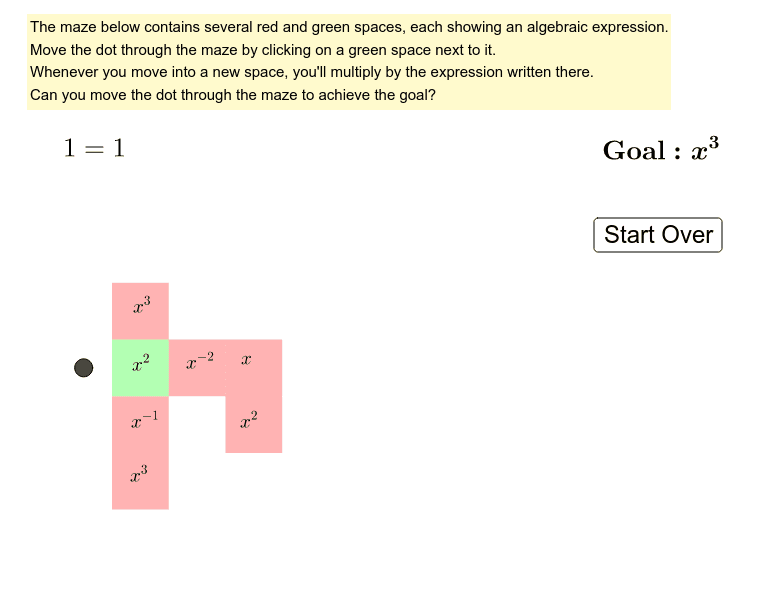
This example demonstrates exponent rules through a puzzle game. Key math concepts include exponent operations and algebraic simplification. It is constructed using GeoGebra commands like Intersect, Polygon, and Point to create geometric figures linked to exponent expressions. Suitable for middle school students and above for practicing exponent rules and for math clubs.
GeoGebra Commands & Parameters
Intersect(xAxis, yAxis) → APolygon(A, B, C, D) → polyA6, a, b, c, dPoint(yAxis) → FPolygon(D, C, E, F) → polyA5, d_1, c_1, e, fPoint(yAxis) → HPolygon(F, E, G, H) → polyA4, f_1, e_1, g, hPoint(yAxis) → JPolygon(J, I, K, L) → polyA2, j_1, i_1, k, lPolygon(L, K, M, N) → polyA1, l_1, k_1, m, nPolygon(B, O, P, C) → polyB6, b_1, o, p, c_2Polygon(C, P, Q, E) → polyB5, c_3, p_1, q, e_2Polygon(E, Q, R, G) → polyB4, e_3, q_1, r, g_2Polygon(G, R, S, I) → polyB3, g_3, r_1, s, i_2Polygon(I, S, T, K) → polyB2, i_3, s_1, t, k_2Polygon(K, T, U, M) → polyB1, k_3, t_1, u, m_1Point(xAxis) → VPolygon(O, V, W, P) → polyC6, o_1, v, w, p_2Polygon(P, W, Z, Q) → polyC5, p_3, w_1, z_1, q_2Polygon(Q, Z, A_1, R) → polyC4, q_3, z_2, a_1, r_2Polygon(R, A_1, B_1, S) → polyC3, r_3, a_2, b_2, s_2Polygon(S, B_1, C_1, T) → polyC2, s_3, b_3, c_4, t_2Polygon(T, C_1, D_1, U) → polyC1, t_3, c_5, d_2, u_1Point(xAxis) → E_1Polygon(V, E_1, F_1, W) → polyD6, v_1, e_4, f_2, w_2Polygon(W, F_1, G_1, Z) → polyD5, w_3, f_3, g_4, z_3Polygon(Z, G_1, H_1, A_1) → polyD4, z_4, g_5, h_2, a_3Polygon(A_1, H_1, I_1, B_1) → polyD3, a_4, h_3, i_4, b_4Polygon(B_1, I_1, J_1, C_1) → polyD2, b_5, i_5, j_2, c_6Polygon(C_1, J_1, K_1, D_1) → polyD1, c_7, j_3, k_4, d_3Point(xAxis) → L_1Polygon(E_1, L_1, M_1, F_1) → polyE6, e_5, l_2, m_2, f_4Polygon(F_1, M_1, N_1, G_1) → polyE5, f_5, m_3, n_1, g_6Polygon(G_1, N_1, O_1, H_1) → polyE4, g_7, n_2, o_2, h_4Polygon(H_1, O_1, P_1, I_1) → polyE3, h_5, o_3, p_4, i_6Polygon(I_1, P_1, Q_1, J_1) → polyE2, i_7, p_5, q_4, j_4Polygon(J_1, Q_1, R_1, K_1) → polyE1, j_5, q_5, r_4, k_5Point(xAxis) → S_1Polygon(L_1, S_1, T_1, M_1) → polyF6, l_3, s_4, t_4, m_4Polygon(M_1, T_1, U_1, N_1) → polyF5, m_5, t_5, u_2, n_3Polygon(N_1, U_1, V_1, O_1) → polyF4, n_4, u_3, v_2, o_4Polygon(O_1, V_1, W_1, P_1) → polyF3, o_5, v_3, w_4, p_6Polygon(P_1, W_1, Z_1, Q_1) → polyF2, p_7, w_5, z_5, q_6Polygon(Q_1, Z_1, A_2, R_1) → polyF1, q_7, z_6, a_5, r_5
AI Drawing Prompt Reference
Draw a grid-like figure composed of multiple rectangles arranged in a stepped pattern. Start from the origin where axes intersect, then place points along the x-axis and y-axis sequentially. Connect adjacent points to form rectangles, grouping them into sets of six. Each group extends from the upper-left downward and rightward, creating a dense, symmetric honeycomb-like layout that covers most of the coordinate plane.
The prompt above was compiled from the original drawing commands and is for reference only.