
Exploring Trigonometric Ratios by M. Herring
Loading the math board and drawing, please wait…
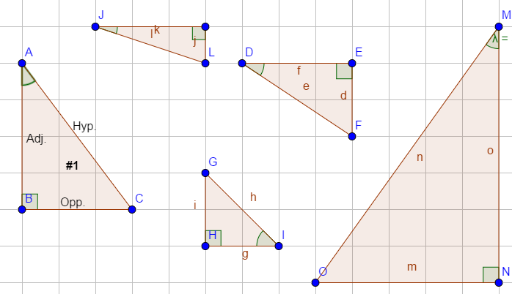
This example uses dynamic geometry tools to explore trigonometric ratios, demonstrating the basic concepts of sine, cosine, and tangent. It utilizes polygons, angles, and line segments to observe how trigonometric values change with angle adjustments. Suitable for middle school and above students to learn the fundamental properties of trigonometric functions.
GeoGebra Commands & Parameters
Polygon(A, B, C) → poly1, c, a, bPolygon(D, E, F) → poly2, f, d, ePolygon(G, H, I) → poly3, i, g, hPolygon(J, K, L) → poly4, l, j, kAngle(C, B, A) → αAngle(I, H, G) → βAngle(D, E, F) → γAngle(J, K, L) → δPolygon(M, N, O) → poly5, o, m, nAngle(M, N, O) → εAngle(B, A, C) → ζAngle(G, I, H) → ηAngle(F, D, E) → θAngle(L, J, K) → ιAngle(L, J, K) → κAngle(O, M, N) → λ
AI Drawing Prompt Reference
Draw five right triangles, each with three vertices and one acute angle marked. In each triangle, connect the right-angle vertex to the acute-angle vertex with a line segment to form a right-angle indicator. Label the acute angle and its complementary angle in each triangle, resulting in ten angle labels total. Arrange the triangles neatly to show how side lengths and angles relate, allowing observation of sine, cosine, and tangent values as angles change. Ensure the layout is clear for comparing trigonometric ratios across different angles.
The prompt above was compiled from the original drawing commands and is for reference only.