
Exploring Trapezoid Properties with GeoGebra
Loading the math board and drawing, please wait…
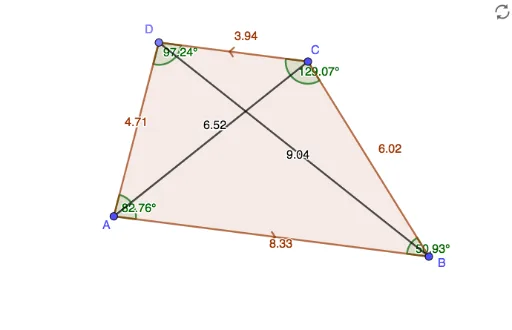
This GeoGebra example dynamically demonstrates the fundamental properties of a trapezoid, including parallel sides, base angles, and midline relationships. Constructed using Segment, Line, Point, Polygon, and Angle commands, it explores planar geometry, trigonometric functions, and parameter-dependent shape transformations. Suitable for middle and high school mathematics education, it helps students visualize quantitative relationships and geometric invariants under parameter variation, bridging spatial concepts with function-based reasoning.
GeoGebra Commands & Parameters
Segment(A, B) → fLine(C, f) → gPoint(g) → DPolygon(A, B, C, D) → q1, a, b, c, dAngle(A, D, C) → αAngle(D, C, B) → βAngle(C, B, A) → γAngle(B, A, D) → δSegment(D, B) → hSegment(C, A) → i
AI Drawing Prompt Reference
Draw a quadrilateral with one side fixed and the opposite side lying on a line parallel to the fixed side, with one endpoint of that opposite side movable along the line. Connect the four vertices to form the quadrilateral, and label all four interior angles. Then draw the two diagonals. The figure should illustrate basic trapezoid properties, including parallel sides, base angles, and leg relationships, allowing shape variation by moving the vertex.
The prompt above was compiled from the original drawing commands and is for reference only.