
Exploring Translations: Vector-Based Triangle Transformation
Loading the math board and drawing, please wait…
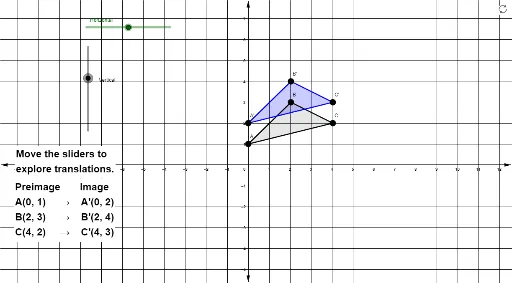
① This GeoGebra example dynamically demonstrates how a triangle moves under a translation transformation, showing the new position of the triangle and its sides (including tangent lines) as they shift together, making the geometric effect of translation visually clear. ② Core mathematical concepts include translation, vectors and their addition, and the property that tangent lines are preserved under translation; the construction also involves right triangles and logarithmic elements, but the focus is on translation and vectors. ③ Construction highlights: from the summary, the Polygon command creates triangle poly1 with vertices A, B, C and sides a, b, c; a translated copy poly1_1 with vertices A', B', C' and sides a_1, b_1, c_1 is generated, along with text objects text3 and text2 for labeling; the translation is controlled by a vector. ④ Suitable for middle school to high school students learning geometric transformations, and for teachers demonstrating the vector nature of translation and congruence of figures.
GeoGebra Commands & Parameters
Polygon(A, B, C) → poly1, c, a, bPolygon(A', B', C') → poly1_1, c_1, a_1, b_1
AI Drawing Prompt Reference
Draw a triangle and its translated copy shifted by a vector. The original triangle and its image have corresponding sides parallel and equal, showing congruence. Indicate the translation vector with an arrow or segment connecting one original vertex to its corresponding translated vertex. Use solid outlines for both triangles and label vertices to distinguish the original from the image. The diagram should clearly illustrate the effect of translation, emphasizing the role of the vector in moving the shape.
The prompt above was compiled from the original drawing commands and is for reference only.