
Exploring the Circumcenter of a Triangle with Dynamic Geometry
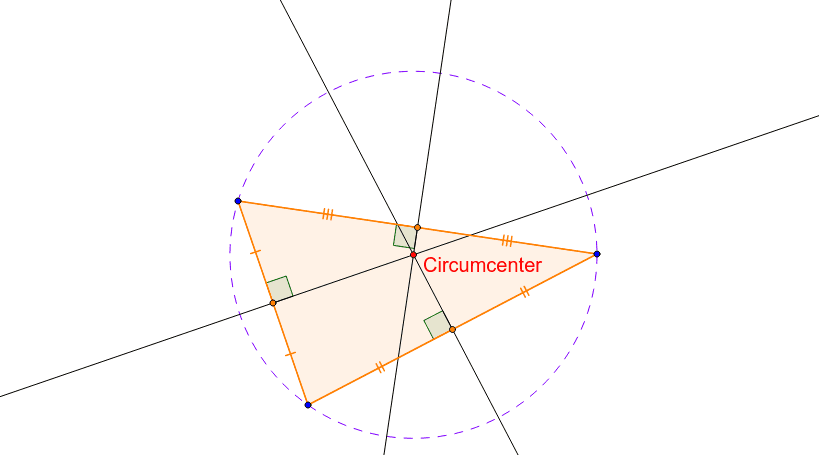
Loading the math board and drawing, please wait…
In collections
Geometry - Points of Concurrency
This interactive GeoGebra applet lets students manipulate the vertices A, B, C of a triangle and observe how the circumcenter moves in real time, reinforcing the relationship between triangle shape and its circumcenter. The construction uses the Polygon command to create the triangle, LineBisector to draw perpendicular bisectors, Intersect to locate the circumcenter, and Circle to draw the circumcircle. It is designed for middle and high school geometry lessons, helping students explore properties of triangles, circumcircles, and perpendicular bisectors through hands‑on dynamic visualization.
GeoGebra Commands & Parameters
Polygon(A, B, C) → poly1, c, a, bLineBisector(c) → dLineBisector(b) → eLineBisector(a) → fIntersect(d, e) → CircumcenterCircle(Circumcenter, C) → gIntersect(a, f) → EIntersect(e, b) → FIntersect(d, c) → GSegment(A, G) → hSegment(G, B) → iSegment(B, E) → jSegment(E, C) → kSegment(C, F) → lSegment(F, A) → mIntersect(g, e) → D, HIntersect(g, d) → I, JIntersect(g, f) → K, LAngle(L, E, B) → αAngle(A, F, H) → βAngle(J, G, A) → γ
AI Drawing Prompt Reference
Draw a triangle ABC, then construct the perpendicular bisectors of its three sides, and their intersection is the circumcenter O. Next, draw a circle with O as the center and C as the radius, which is the circumcircle. Finally, connect each vertex to O, and O to points on the circumcircle to form the relationships of the triangle's perpendicular bisectors and the circumcircle.
The prompt above was compiled from the original drawing commands and is for reference only.