
Exploring Symmetry
Loading the math board and drawing, please wait…
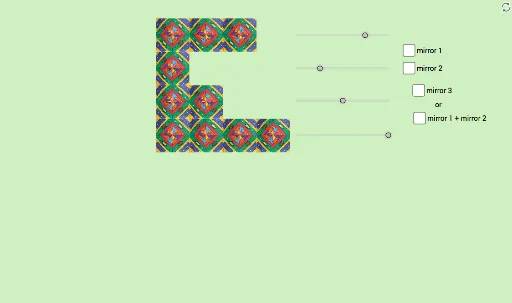
This example demonstrates the construction of symmetric figures through rotation and reflection operations. Core mathematical concepts include symmetry, rotation, reflection, polygons, and trigonometric functions. It leverages GeoGebra commands and objects such as Circle, Point, Rotate, squarearoundagivenpoint, Intersect, Vector, Translate, Line, and Mirror as outlined in the construction summary. Suitable for high school students learning geometric transformations and symmetry, or for math clubs exploring these concepts.
GeoGebra Commands & Parameters
Circle(A, sqrt(2)) → aPoint(a) → A_1Rotate(A_1, 90°, A) → A_2Rotate(A_2, 90°, A) → A_3Rotate(A_3, 90°, A) → A_4squarearoundagivenpoint(B) → B_1, B_2, B_3, B_4, bsquarearoundagivenpoint(C) → C_1, C_2, C_3, C_4, csquarearoundagivenpoint(D) → D_1, D_2, D_3, D_4, dsquarearoundagivenpoint(E) → E_1, E_2, E_3, E_4, eIntersect(xAxis, yAxis) → KPoint(yAxis) → LVector(K, L) → uTranslate(pic1, u) → pic5Translate(pic5, u) → pic9Translate(pic9, u) → pic13Translate(pic2, u) → pic6Translate(pic6, u) → pic10Translate(pic10, u) → pic14Translate(pic3, u) → pic7Translate(pic7, u) → pic11Translate(pic11, u) → pic15Translate(pic4, u) → pic8Translate(pic8, u) → pic12Translate(pic12, u) → pic16Line(F, G) → fMirror(pic1, f) → pic1'Mirror(pic5, f) → pic5'Mirror(pic9, f) → pic9'Mirror(pic13, f) → pic13'Line(H, I) → jMirror(pic2, f) → pic2'Mirror(pic6, f) → pic6'Mirror(pic10, f) → pic10'Mirror(pic14, f) → pic14'Mirror(pic3, f) → pic3'Mirror(pic7, f) → pic7'Mirror(pic11, f) → pic11'Mirror(pic15, f) → pic15'Mirror(pic4, f) → pic4'Mirror(pic8, f) → pic8'Mirror(pic12, f) → pic12'Mirror(pic16, f) → pic16'Line(J, M) → kMirror(pic1, k) → pic1'_1Mirror(pic5, k) → pic5'_1Mirror(pic9, k) → pic9'_1Mirror(pic13, k) → pic13'_1Mirror(pic2, k) → pic2'_1Mirror(pic6, k) → pic6'_1Mirror(pic10, k) → pic10'_1Mirror(pic14, k) → pic14'_1Mirror(pic15, k) → pic15'_1Mirror(pic11, k) → pic11'_1Mirror(pic7, k) → pic7'_1Mirror(pic3, k) → pic3'_1Mirror(pic4, k) → pic4'_1Mirror(pic8, k) → pic8'_1Mirror(pic12, k) → pic12'_1Mirror(pic16, k) → pic16'_1Mirror(pic1, j) → pic1'_2Mirror(pic5, j) → pic5'_2Mirror(pic9, j) → pic9'_2Mirror(pic13, j) → pic13'_2Mirror(pic2, j) → pic2'_2Mirror(pic6, j) → pic6'_2Mirror(pic10, j) → pic10'_2Mirror(pic14, j) → pic14'_2Mirror(pic3, j) → pic3'_2Mirror(pic7, j) → pic7'_2Mirror(pic11, j) → pic11'_2Mirror(pic15, j) → pic15'_2Mirror(pic4, j) → pic4'_2Mirror(pic8, j) → pic8'_2Mirror(pic12, j) → pic12'_2Mirror(pic16, j) → pic16'_2Mirror(pic1', k) → pic1''Mirror(pic2', k) → pic2''Mirror(pic3', k) → pic3''Mirror(pic4', k) → pic4''Mirror(pic5', k) → pic5''Mirror(pic6', k) → pic6''Mirror(pic7', k) → pic7''Mirror(pic8', k) → pic8''Mirror(pic9', k) → pic9''Mirror(pic10', k) → pic10''Mirror(pic11', k) → pic11''Mirror(pic12', k) → pic12''Mirror(pic13', k) → pic13''Mirror(pic14', k) → pic14''Mirror(pic15', k) → pic15''Mirror(pic16', k) → pic16''
AI Drawing Prompt Reference
Draw a symmetric figure by starting with a circle and creating five points on it. Rotate these points by 90 degrees each to get five new points. Then, draw squares around five different points and perform translation and reflection operations on them to demonstrate symmetry. Finally, connect specific points to draw lines and complete mirror operations to create a rich display of symmetric transformations.
The prompt above was compiled from the original drawing commands and is for reference only.