
Exploring Special Right Triangles
Loading the math board and drawing, please wait…
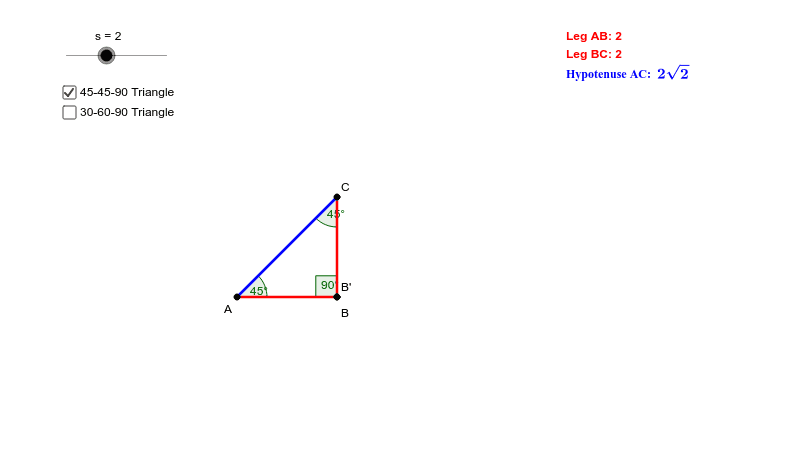
This example uses dynamic geometry tools to explore the properties of special right triangles. Key mathematical concepts include the properties of right triangles, the relationship between angles and sides. Using GeoGebra commands such as Point, Segment, Rotate, Angle, etc., the construction process of right triangles is vividly demonstrated. Suitable for middle school and above students and teachers.
GeoGebra Commands & Parameters
Point(Circle[A, s]) → BSegment(A, B) → aRotate(A, 270°, B) → CRotate(B, 270°, B) → B'Segment(C, B') → a'Segment(A, C) → bAngle(C, B, A) → αAngle(B, A, C) → βAngle(A, C, B) → γPoint(Circle[X, s]) → YSegment(X, Y) → dRotate(Y, 60°, X) → Y'Angle(Y, X, Y') → δLine(X, Y') → eRotate(X, 270°, Y) → X'Angle(X', Y, X) → εLine(Y, X') → fIntersect(e, f) → ZSegment(Y, Z) → gSegment(X, Z) → hAngle(X, Z, Y) → ζ
AI Drawing Prompt Reference
Draw a right triangle with labeled vertices and sides, then rotate the hypotenuse 270 degrees around each leg to get two new points. Connect these points to form two new triangles. Label all angles. Draw a circle centered at one point to get another point, connect these two points, rotate the line segment 60 degrees to get another point, and connect these points to draw a line. Repeat this process with another point to form two more triangles. Label all angles and intersection points, then connect specific points to form new line segments and label the angles.
The prompt above was compiled from the original drawing commands and is for reference only.