
Exploring Sine and Cosine Ratios
Loading the math board and drawing, please wait…
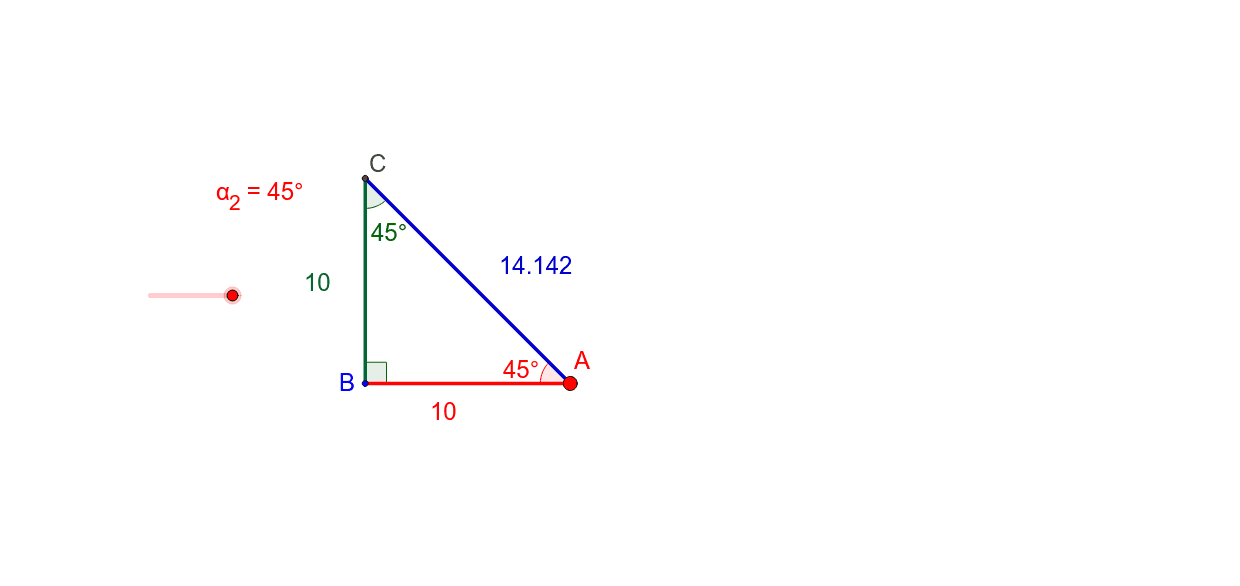
This example demonstrates how to explore sine and cosine ratios in right triangles through dynamic constructions. Core math concepts include trigonometric functions, similarity transformations, and geometric constructions. Construction highlights involve using GeoGebra commands like Segment, Point, Rotate, Angle, Line, Intersect to build triangles and show the relationships between their side lengths and angles. Suitable for high school students learning trigonometric functions and geometric constructions, helping to understand the definitions and properties of trigonometric functions.
GeoGebra Commands & Parameters
Segment((0, 0), (10, 0)) → aPoint(a) → ASegment((0, 0), A) → adjRotate(B, (-α_2), A) → B'Angle(B', A, B) → βLine(A, B') → cIntersect(c, yAxis) → CSegment(C, B) → oppSegment(C, A) → eAngle(B, C, A) → γAngle(A, B, C) → δ
AI Drawing Prompt Reference
Draw a right triangle with one leg on the x-axis of length 10. Use rotation and construction to show the adjacent side, opposite side, and hypotenuse, and their relationships with the angles. Start by drawing a horizontal line segment as the base, then place a point at one end to form the adjacent side from the origin. Rotate the adjacent side to get the opposite side, construct the hypotenuse intersecting the y-axis, and finally draw the opposite side and hypotenuse, labeling the angles.
The prompt above was compiled from the original drawing commands and is for reference only.